
 By Yuvrajsinh Vaghela
Contents
If you’ve been wondering what a portal website is and how it compares to a regular website, you’re in the right place. In the website vs portal debate, the right choice depends entirely on your business goals, audience, and technical needs.
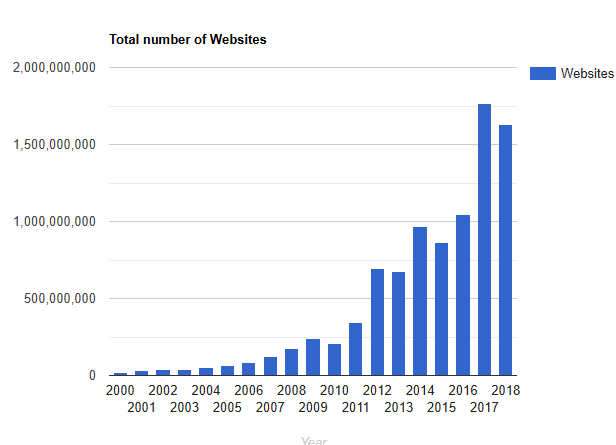
According to ResearchNester, the global enterprise portal market is projected to reach $18 billion by 2030, driven by the growing demand for self-service platforms across industries. At the same time, there are over 1.1 billion websites on the internet yet fewer than 20% are actively maintained.
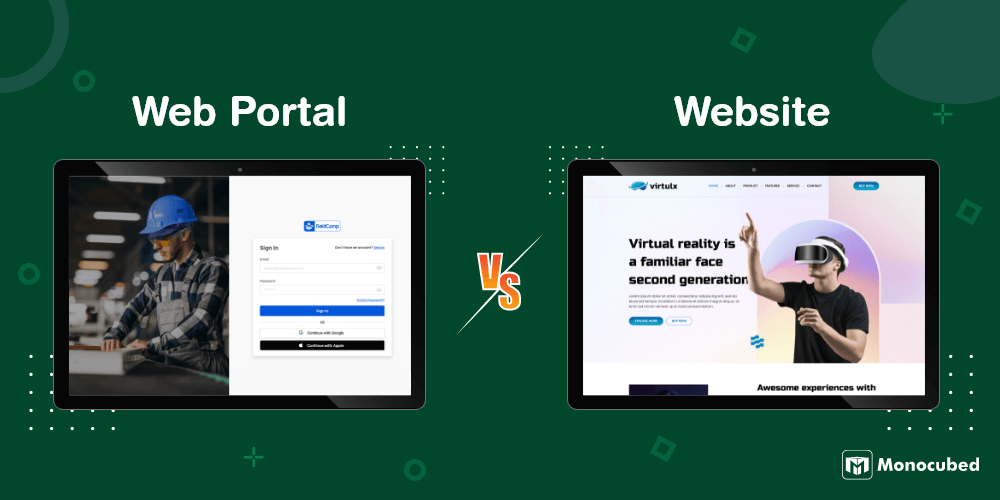
Although websites and web portals both operate through web-based interfaces, they serve fundamentally different purposes. A website primarily acts as a public-facing platform for sharing information and building brand presence, whereas a web portal provides secure, personalized access to tools, services, and data for specific user groups.
This is where Monocubed helps businesses. We design and develop scalable, secure, and user-centric web development solutions tailored to unique operational requirements and business goals.
We’ve created this guide to help you understand the key difference between website and web portal and determine which solution best aligns with your digital objectives.
What is the Website?
A website is a collection of interlinked web pages hosted under the same domain name and published on at least one web server. To simplify, it is a group of related web pages accessible to anyone with an internet connection — for example, Monocubed.com, Amazon.com, or Wikipedia.org.
What is a webpage?
A webpage is a single document connected to the World Wide Web. You can view it through web browsers like Google Chrome, Mozilla Firefox, Microsoft Edge, or Apple Safari, and find it through search engines such as Google or Bing.
What is the difference between a webpage and a website?
A webpage is a single page (like this blog post you’re reading right now), while a website is the entire collection of related pages under one domain name. Think of a webpage as one chapter and a website as the whole book.
What is a web server?
A web server is the computer that hosts these webpages on the internet, making them accessible through a domain name — a human-readable address like www.example.com.
Types of Websites
There are three main types of websites:
1. Static websites
These are web pages with fixed content — plain text, images, videos, or digital brochures. The content remains the same regardless of when or how often a user visits. Static websites are ideal for small businesses, portfolios, and landing pages that don’t need frequent updates. Examples include simple business card sites and product brochures.
2. Dynamic websites
Dynamic websites update their content automatically based on templates, scripts, databases, or user behavior. Every time a user visits, the content can change — think of news sites like BBC.com or e-commerce platforms like Amazon.com that display personalized product recommendations.
3. Interactive websites
Interactive websites go a step further with rich graphics, user-generated content, and two-way engagement. Users can post comments, leave reviews, submit forms, and interact with the business directly. Social media platforms and community forums are prime examples. Most modern businesses prefer interactive websites because they boost engagement and build customer relationships.If you need a high-quality, custom-built website for your business, you can hire experienced web developers to bring your vision to life.
Looking for a Website Development Company?
Talk to us. Share your requirements with our web developers and get free consultation.
What is a Web Portal?
A web portal, also referred to as a portal website, online portal, or internet portals, is a secure, web-based platform that acts as a single point of access to personalized information, tools, and services for authenticated users.
Unlike a regular website, a web based portal requires users to log in with credentials. Once authenticated, each user sees content tailored to their role, permissions, and needs. The portal aggregates data from multiple sources into a unified interface, making it a centralized hub for specific audiences.
Portal websites are designed to provide targeted audience experiences, control what users can see and do, integrate multiple backend systems, and offer advanced user management features like role-based access and permissions.
There are real-world web portal examples across healthcare, education, banking, and enterprise and each delivers unique, personalized experiences to every user.
Types of web portals
Portal web applications can be categorized based on their scope, audience, and functionality. While they are often broadly grouped into horizontal and vertical portals, modern businesses use several specialized portal types designed for specific operational needs.
The most common types include:
- Horizontal web portals – Broad platforms that provide access to diverse information and services across multiple categories, such as communication tools, productivity apps, news, and collaboration resources.
- Vertical web portals – Industry- or domain-specific portals designed for niche audiences, offering specialized tools, content, and workflows tailored to a particular business sector or user group.
- Customer portals – Secure platforms that allow customers to access personalized services such as order tracking, support tickets, account management, billing information, and self-service resources. Developing a customer portal helps you centralize these tasks and improve their engagement for better business outcomes.
- Employee (intranet) portals – Internal business platforms that centralize company resources, HR tools, communication channels, project management, and organizational knowledge for employees.
- Partner and vendor portals – Collaboration portals that enable businesses to manage relationships with suppliers, distributors, and partners through shared documentation, communication tools, and workflow automation. Whether building a vendor portal or B2B partner portal, it improves your business collaboration and smooth business.
- eLearning and educational portals – Platforms designed for digital learning, offering course materials, assessments, progress tracking, virtual classrooms, and student-teacher collaboration. E-leading portal development allows you to create a digitalized portal for students to keep their academic knowledge up-to-date and help teachers to keep track of the progress of every student and improve their scores.
- Community and membership portals – User-focused platforms that provide members with exclusive content, discussion forums, networking opportunities, and subscription-based services.
- Government and service portals – Public service platforms that allow citizens to access government services, submit applications, manage documents, and interact with public administration digitally.
Now that you understand what both websites and web portals are, the next section explore — website vs web portal? Let’s break it down across 7 key areas.
Want to Develop a Web Portal for your Business?
We have built robust web portals for multiple industries to provide engaging development solutions for your business.
7 Key Differences Between a Website and a Web Portal
The core difference between a website and a web portal comes down to access, purpose, and user experience. While both exist on the internet and use web-based interfaces, the way they serve users is fundamentally different.
Below, we break down each difference in detail so you can clearly see where a website ends and a web portal begins.
Difference 1. Purpose and audience
The most fundamental difference lies in who the platform is built for and why.
A website is designed to reach a broad, anonymous audience. Its primary purpose is to inform, promote, or sell — whether that’s through blog posts, product pages, company information, or marketing content. Anyone with an internet connection can access a website without signing up or identifying themselves. Think of it as an open storefront that invites everyone to browse.
A web portal, on the other hand, is built for a specific, known group of users. Its purpose is to deliver personalized services, tools, and information to authenticated users — such as customers, employees, students, or partners. Instead of casting a wide net, a portal creates a focused environment where each user gets exactly what they need.
Example: Tesla.com is a website — anyone can browse car models and specs. A Tesla owner’s account dashboard where they schedule service appointments and track delivery is a portal.
Difference 2. Access and authentication
This is perhaps the most visible difference between a portal and a website.
A website is publicly accessible. There are no gates — visitors don’t need to create an account or log in. Every page is open to everyone, and search engines can crawl and index the entire site. This openness is what makes websites so effective for SEO and reaching new audiences.
A web portal requires authentication. Users must enter login credentials (username and password, or even biometric verification) before they can access any content. This gated access ensures that only authorized users can see sensitive or personalized information. Some portals also use single sign-on (SSO) to let users access multiple systems with one set of credentials.
Example: Wikipedia.org is a website — anyone can read any article. Your company’s employee intranet, where you access payroll and HR documents after logging in, is a portal.
Difference 3. Personalization
Closely tied to authentication, personalization is where websites and portals diverge most dramatically.
A website delivers essentially the same content to every visitor. While some sites use cookies or location data for basic personalization (like showing local prices or language), the core experience doesn’t change from user to user. Every visitor sees the same homepage, the same blog posts, and the same product pages.
A web portal delivers a completely different experience to each user based on their role, permissions, preferences, and history. A manager logging into an HR portal sees team performance reports and approval workflows, while an employee sees their own leave balance and payslips. The content, layout, and available features can all change depending on who is logged in.
Example: BBC.com shows the same news homepage to every visitor (website). Netflix shows a completely different homepage to every logged-in user based on their viewing history (portal-like personalization).
Difference 4. Content Management
How content is created, organized, and delivered also differs significantly.
A website uses relatively simple content management. You publish pages, blog posts, images, and videos — and they’re available to everyone. Most websites run on CMS platforms like WordPress, where content teams can create and update pages without technical expertise. The content lifecycle is straightforward: create, publish, update, archive.
A web portal requires advanced content management with multiple layers. Content isn’t just published — it’s assigned to specific user roles, organized into workflows, and pulled from multiple data sources (databases, CRMs, ERPs, third-party APIs). Portal content is often dynamic and data-driven, meaning it’s generated in real-time based on the user’s context rather than manually published.
Example: A company’s marketing website has a blog and product pages managed through WordPress (simple CMS). The same company’s partner portal pulls inventory data from the ERP, order status from the CRM, and support tickets from Zendesk — all displayed in one unified dashboard (advanced content management).
Difference 5. Security and compliance
Security is where web portals are in a different league entirely. This is one of the most critical differences, especially for businesses in regulated industries.
A website relies on standard security measures — SSL/HTTPS encryption for data in transit, basic form validation, CAPTCHA to prevent spam, and standard hosting security. Since the content is public, the security focus is on protecting the server and preventing attacks (DDoS, SQL injection) rather than protecting user-specific data.
A web portal requires enterprise-grade security. Because portals handle sensitive, user-specific data (medical records, financial information, employee details), they implement multiple layers of protection: multi-factor authentication (MFA), role-based access control (RBAC), data encryption at rest and in transit, session management, audit logs, and IP-based access restrictions. Portals in healthcare must comply with HIPAA, those handling EU user data must follow GDPR, and financial portals must meet PCI-DSS standards.
Example: A local restaurant’s website needs standard SSL security. A hospital’s patient portal (like MyChart) needs HIPAA-compliant security with MFA, encrypted medical records, audit trails, and strict role-based access — because a data breach could expose thousands of patient records.
Difference 6. User engagement
The way users interact with the platform is another key differentiator.
A website primarily supports one-way communication. The business publishes content, and users consume it — they read blog posts, view product pages, watch videos, and maybe fill out a contact form. The user is mostly a passive recipient of information. While interactive elements like comment sections and live chat add some two-way interaction, the core relationship is broadcast-style.
A web portal enables deep, two-way interaction. Users don’t just consume content — they actively participate. They submit data, upload documents, track orders, manage accounts, generate reports, collaborate with other users, and complete workflows. The portal is a working tool, not just an information source. This active engagement is what makes portals essential for building ongoing relationships with customers, employees, and partners.
Example: On Apple.com (website), you browse products and read specs. On the Apple Developer Portal, you upload apps, manage certificates, track review status, access API documentation, and interact with Apple’s development ecosystem — it’s a working environment, not a brochure.
Difference 7. Cost and maintenance
Finally, the investment required to build and maintain each option differs substantially.
A website is generally more affordable to develop and maintain. A basic business website can be launched in days to weeks using platforms like WordPress, Wix, or Squarespace, and hosting costs range from a few dollars to a hundred dollars per month. Get the full picture of how much a website costs for your business.
Maintenance involves content updates, plugin updates, and periodic security patches. You don’t need a dedicated development team for ongoing operations.
A web portal requires a significantly higher investment — both upfront and ongoing. Development takes weeks to months because of authentication systems, role-based access logic, third-party integrations, custom dashboards, and security infrastructure.
Hosting costs are higher due to database requirements and security needs.
Maintenance is more demanding: you need to manage user accounts, update integrations as APIs change, monitor security, ensure compliance, and scale infrastructure as your user base grows. It also adds up more expenses and increases the total web portal development cost.
Most businesses need a dedicated web development team or one of the best web portal development agencies to keep a portal running smoothly.
Example: A freelancer’s portfolio website might cost $500-$2,000 to build and $20/month to host. A customer self-service portal with order tracking, account management, and CRM integration might cost $15,000-$100,000+ to develop and require ongoing maintenance investment.
Quick comparison summary
Here’s a side-by-side snapshot for quick reference:
| Factor | Website | Web Portal |
|---|---|---|
| Purpose | Inform, promote, sell to a broad audience | Deliver personalized services to specific users |
| Access | Public — no login needed | Private — login required |
| Personalization | Same content for all visitors | Unique experience per user |
| Content | Simple CMS publishing | Multi-source, role-based content |
| Security | Standard SSL/HTTPS | MFA, RBAC, encryption, compliance |
| Engagement | One-way (consume content) | Two-way (interact, submit, collaborate) |
| Cost | Lower ($500-$10K typical) | Higher ($15K-$100K+ typical) |
| Development Time | Days to weeks | Weeks to months |
| Scalability | Scales with traffic (CDN, caching) | Scales with users, roles, and integrations |
| Examples | BBC.com, Tesla.com, Wikipedia.org | MyChart, Salesforce dashboards, university portals |
With these 7 differences clearly laid out, the next step is understanding when each option makes practical sense for your business. Let’s get into that.
Detailed Comparison: When to Use a Website vs a Web Portal
Understanding the differences is one thing — applying them to your specific situation is another. This section helps you decide which option fits your business needs, starting with a closer look at what each one brings to the table.
Complete overview of a website and its uses
A website gives you the flexibility to inform clients about your services and products across multiple web pages. It’s the ideal platform for content marketing, search engine visibility, and reaching a wide audience.
Here are the key advantages that make websites the go-to choice for most businesses starting their online presence:
- Broad reach: Accessible to anyone, anywhere, without requiring registration
- SEO-friendly: Search engines can crawl and index all public pages, driving organic traffic
- Cost-effective: Simpler to build, host, and maintain compared to portals
- Content flexibility: You can create unlimited pages — blogs, product pages, landing pages, case studies
- Lead generation: Contact forms, CTAs, and newsletter signups help convert visitors into leads
With proper SEO, a website can increase your company’s visibility, build brand awareness globally, and drive consistent traffic from a wide base of anonymous users.
That said, websites do have limitations — especially when you need to offer personalized experiences or manage user-specific data. That’s exactly where web portals step in.
Complete overview of a web portal and its uses
An online web portal is the best option if your goal is to improve customer, client, or employee experience and build continuous relationships with your audience.
Here are the key advantages that make portals essential for businesses focused on engagement and retention:
- Personalized experience: Each user sees content, dashboards, and tools relevant to their role
- Self-service capabilities: Users can track orders, manage accounts, access reports, and submit requests independently
- System integration: Portals unify data from CRMs, ERPs, databases, and third-party services into one interface
- Role-based access control: Admins can define exactly what each user or user group can see and do
- Scalable collaboration: Supports workflows, approvals, and communication across teams and stakeholders
Think of an eHealth portal with two separate interfaces — one for doctors (patient records, prescriptions, scheduling) and one for patients (appointment booking, test results, billing). Same portal, completely different experiences.
Website portal development is typically more complex and costly than building a standard website due to authentication systems, role-based access, and third-party integrations. Portal website design requires careful UX planning, as users need intuitive dashboards, clear navigation between modules, and personalized views based on their roles.
So, how do you decide which route to take? Here’s a simple breakdown.
When to build a website
Choose a website if:
- Your primary goal is to reach a broad audience and generate traffic
- You need the site to operate independently without backend system integrations
- Your focus is on content delivery — blogs, product pages, marketing materials
- You want a cost-effective online presence with lower maintenance overhead
- You don’t need user authentication or personalized dashboards
When to build a web portal
Choose a web portal if:
- You need to integrate multiple systems into a single, unified interface
- You want to provide personalized experiences for different user groups
- You need control over what users see and access based on roles and permissions
- You want to enhance customer relationships through self-service tools
- Security and compliance (GDPR, HIPAA) are critical requirements
- You need advanced user management features like MFA, RBAC, and audit logs
Beyond websites and portals, there’s another term that often causes confusion — platforms. Let’s clear that up next.
Not Sure Which One Your Business Needs?
Our team has helped companies across healthcare, education, and eCommerce make this exact decision. Talk to our web development experts, we’ll help you choose the right approach and build a roadmap tailored to your goals.
Web Portal vs Website – Who Wins?
It’s a tie. Both a website and a web portal allow you to communicate with your target audience, provide content, and sell products and services online. They’re not competitors — they’re complementary tools that serve different purposes.
The right choice depends on:
- Your business objectives: Awareness and traffic? Website. Self-service and engagement? Portal.
- Your audience: Anonymous visitors? Website. Known, authenticated users? Portal.
- Your technical infrastructure: Simple content needs? Website. Multiple system integrations? Portal.
- Your budget: Lower upfront cost? Website. Long-term relationship building? Portal.
- Compliance requirements: Standard needs? Website. GDPR/HIPAA/regulated industries? Portal.
In many cases, the best answer is both — a public website for discovery and a secure portal for engagement (see the Hybrid Solutions section above).
Starting With a Website or a Web Portal
Choosing between aportal vs website doesn’t have to be complicated. Here’s the bottom line:
- If you need public visibility and broad reach, start with a website.
- If you need personalized experiences for known users, build a web portal.
- If you need both, a hybrid approach gives you the best of both worlds.
The key is to align your choice with your business goals, audience needs, and technical requirements — not to follow trends or build more than you need.
At Monocubed, we help businesses make this decision and execute it. As a trusted web application development company based in Canada, we’ve designed and built websites, web portals, and hybrid solutions for healthcare, education, eCommerce, and technology companies.
Whether you’re starting from scratch or re-engineering an existing system, we follow a systematic approach to deliver web solutions that fit your specific business needs.
Ready to Get Started?
Share your requirements with our team and receive a custom development roadmap — no commitment, no pressure.
FAQs
How much time does it take to develop a web portal from scratch?
The answer is pretty straightforward. It completely depends on both your needs and the expertise of your web portal development company, and after that, the architecture and the web portal content to be published are hosted.
Building web portals can take 2-10 weeks to see a prototype and 2-5 months to have a working portal application.
What are some examples of vertical and horizontal portals in existence today?
The vertical portals include ESPN.com, iVillage, NFL.com, Blackvoices.com, WebMD, Aflcio.org, Gamers.com, Away.com, and T-online.
The horizontal or general portals include Earthlink.net, Lycos, Orange.co.uk, and Sympatico.msn.ca.
What are the best web development languages?
There are many web development languages in the industry, so choosing one is critical. The most common languages used for website development are JavaScript, HTML, CSS, and PHP.
According to Statista, Javascript is the most used language for websites and web portals.
What do you mean by a web address?
The web address contains information about the web page’s location. It is also referred to as the URL (uniform resource locator).
A web address, like a street address, organizes information about the location of a web page in a predictable way.
For example http://www.google.com
Why is web presence so important?
Having an online presence allows you to build your brand and gain the credibility needed to attract more customers. Along with making your business readily accessible, an online presence also gives your customers an easy way to find out more about your offer.
What are website designing services?
A web design service provides a customized website design that is perfect for your business site. They’ll help you to create a design that matches your brand while giving your customers a seamless user experience that will delight them. When considering your website design, also keep in mind factors like logo design cost, as branding elements are essential for a cohesive online presence.

 All our projects are secured by NDA


