
 By Yuvrajsinh Vaghela
Contents
Most people interact with a web portal daily without thinking about it — logging into a patient portal to review lab results, submitting a request through an employee self-service system, or tracking an order through a vendor dashboard. These are not regular websites. They are purpose-built digital environments that deliver personalized access to information, tools, and services based on who you are and what you need.
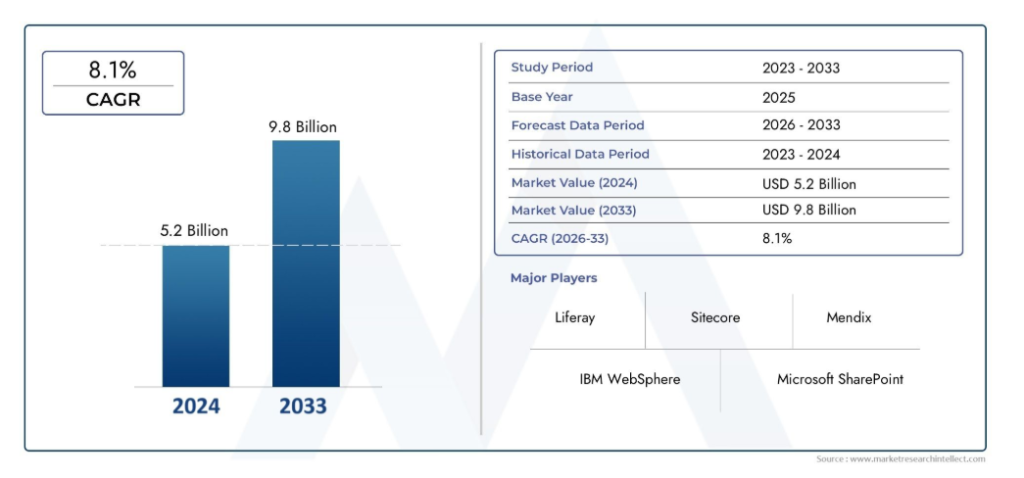
According to recent market analysis from market research intellect, the global web portal software market is projected to reach $9.8 million by 2033, growing at a CAGR of 7.11% — a clear signal that businesses across every industry are doubling down on portal infrastructure.
Yet despite how common they are, many businesses still underestimate what makes a portal effective or what it takes to build one that users actually return to.
This guide breaks down 15 real-world web portal examples across different industries, explains the types of web portals available, and walks you through how to create a web portal that delivers measurable results. Whether you are an entrepreneur looking for portal website design ideas, a developer researching web application examples, or a business leader evaluating proven models for your next project, you will find practical direction here.
If you are already ready to build, explore our web portal development services to see how Monocubed can help.
What Are the Different Types of Web Portals?
Before diving into real-world examples, it helps to understand the types of web portals available so you can identify which portal model fits your business needs. For a deeper breakdown, read our dedicated guide on types of web portals. Here is a list of web portals categorized by their target audience and primary function:
- Customer Portal – Provides customers with self-service access to accounts, orders, support tickets, and knowledge bases.
- Employee Portal – An internal platform where staff access HR resources, payroll, training, policies, and company news.
- Vendor Portal – A secure portal for supplier collaboration, procurement, invoice management, and order tracking.
- Patient Portal – A healthcare-specific portal enabling patients to view medical records, book appointments, and message providers.
- Education Portal – Also known as a student portal, it centralizes academic resources, course materials, grades, and enrollment tools for students and faculty.
- Government Portal – A citizen-facing platform offering access to public services, applications, permits, and government information.
- Financial/Banking Portal – Enables account management, transactions, financial planning, and investment tracking for banking customers.
- eCommerce Portal – A B2B or B2C portal website that manages product catalogs, orders, dealer pricing, and supply chain operations. Learn more about the types of eCommerce portals.
- Partner Portal – A portal website where business partners access marketing materials, training, deal registration, and performance dashboards.
- Intranet Portal – A corporate portal that acts as a private network portal for internal communication, collaboration, and document management.
- Community Portal – Online portals that bring together users with shared interests through discussion forums, events, and resource sharing.
- Information Portal – Aggregates news, data, and content from multiple sources into a single, searchable interface.
- Job Portal – Dedicated application portals connecting employers with job seekers through listings, applications, and recruitment tools.
Each of these types of portals can be customized to match your specific business requirements. To understand what makes a great portal, explore the essential features of a web portal.
Now that you know the different portal types, let’s look at why investing in one is worth it for your business.
Why Does Your Business Need a Web Portal?
Web portals offer much more than just a gateway to information. Here is why businesses across industries are investing in portal development:
- Centralized Access – A web portal consolidates tools, data, and services into a single platform, eliminating the need for users to navigate multiple systems or websites.
- Self-Service Capabilities – Users can complete tasks independently, whether it is checking order status, downloading invoices, or scheduling appointments, reducing the workload on support teams.
- Personalization – Unlike a standard website, portal sites deliver content, dashboards, and tools customized to each user’s role, location, and preferences.
- Improved Collaboration – Online portals facilitate real-time collaboration between internal teams, external partners, and clients through discussion forums, shared documents, and messaging tools.
- Enhanced Security – With authentication, role-based access control, and data encryption, a secure portal ensures sensitive information stays protected.
- Cost Reduction – By automating repetitive tasks and enabling self-service, web portals can significantly reduce operational and support costs.
- Better Decision-Making – Real-time dashboards and analytics built into digital portals give stakeholders the data they need to make informed decisions.
These benefits are not just theoretical. The following real-world examples show exactly how leading organizations are using web portals to deliver these results.
15 Best Web Portal Examples Across Every Industry
Education Portal Examples
1. Stanford University Student and Faculty Portal
Category: Education Portal | Student Portal Example
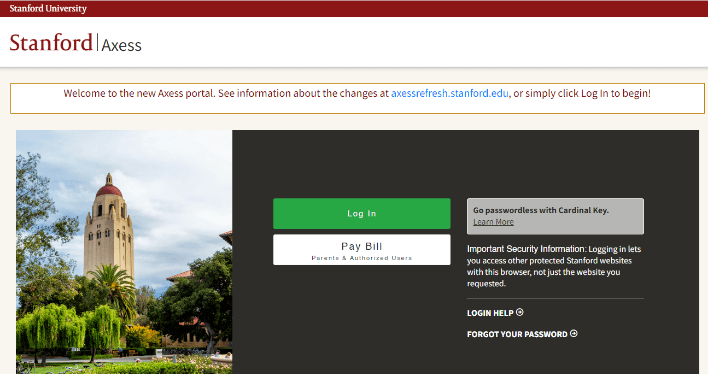
Stanford University’s web portal, known as AXESS, is one of the best educational portals examples in higher education. This secure student portal provides a centralized platform where students, faculty, administrators, and parents can access academic information and complete essential tasks.
The student and faculty portal enables functions related to academic advising, enrollment and financials, teaching and grading, employment and training, and workflow-enabled administrative processes. As a school portal example, AXESS demonstrates how a well-designed education portal can serve thousands of users with different roles from a single unified platform.
Stanford University’s web-based portal has a user-centric design built on the latest UX standards, providing easy access across mobile, laptop, and desktop devices.
Features integrated in Stanford University portal
| Feature | Description |
|---|---|
| Course Material Library | Real-time access to a library of course materials anytime, anywhere. Faculty can monitor student performance through the faculty dashboard. |
| Multi-Role Resource Access | Direct access to resources for students, faculty, admin, and parents. Students can access account information via any device. |
| Online Exam Assessment | Test and exam assessments conducted through the portal with automated grading and result publishing. |
| Discussion Forums and Communities | Online communities and discussion forums for students, administrators, and alumni to collaborate and support each other. |
| Enrollment and Financial Management | Students can manage enrollment, view financial aid status, and process tuition payments through the portal. |
2. Khan Academy Learning Portal
Category: Education Portal | Learning Portal Example
Khan Academy is a globally recognized learning portal example that provides free access to educational content across subjects including math, science, computing, and economics. With over 150 million registered users, it is one of the best web portals in the education space.
This education portal offers personalized learning paths where students receive content recommendations based on their progress and skill level. Teachers and parents also have dedicated dashboards to track learner performance, making it one of the top web portal examples for students available today. If you are planning to build a similar platform, explore our guide on eLearning portal development.
Features Integrated in Khan Academy Portal
| Feature | Description |
|---|---|
| Personalized Learning Dashboard | Adaptive algorithms deliver content based on the learner’s skill level and progress, tailoring the experience to individual needs. |
| Teacher and Parent Portals | Dedicated dashboards for educators and parents to monitor student progress, assign exercises, and view performance reports. |
| Multi-Language Support | Content available in over 50 languages, making this portal accessible to a global audience. |
| Mastery-Based Learning System | Students progress through content by demonstrating mastery, not by time spent, ensuring deeper understanding. |
| Mobile Accessibility | Fully functional mobile app providing easy access to all portal features on any device. |
Want to Build an Education or Student Portal?
We build custom eLearning and student portals that simplify enrollment, course management, and academic collaboration.
Education web portals are just one side of the story. In the financial sector, web portals play an equally important role by helping banks and insurance companies serve millions of customers through secure, self-service platforms.
Financial and Banking Portal Examples
3. Allianz Wealth Management
Category: Financial Portal | Insurance Portal Example
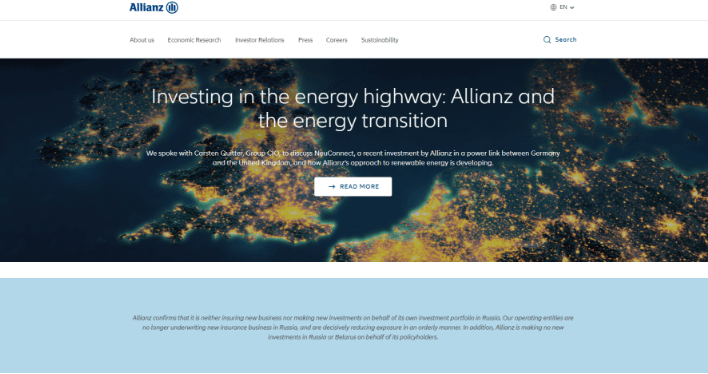
Allianz Wealth Management is one of the top insurance portals examples in the financial industry. The Allianz Group serves approximately 126 million customers across 70 countries, and their web portal is a sample portal website that showcases how digital portals can personalize financial services at scale.
The “My Insurance Portfolio” feature gives users the ability to retrieve historical records of purchased financial products, track claims, and manage policy payments from a single interface. Users can also update communication preferences and contact information through the portal login. As an online portal example, Allianz demonstrates how a personalized, data-driven portal website can improve customer retention and satisfaction.
If you are looking to develop a similar financial portal, read our complete guide on insurance portal development or hire web developers from an experienced web development company for your business needs.
Features Integrated in Allianz Web Portal
| Feature | Description |
|---|---|
| Multi-Layer Security | Customer data protection through encryption, multi-factor authentication, and compliance with financial data regulations. |
| AI-Powered Chatbot Service | Automated chatbot provides 24/7 customer support for common queries, policy questions, and claims status updates. |
| Digital Policy Management Tools | Flexible digital tools for policy payments, coverage comparison, renewal management, and premium calculations. |
| Intuitive Navigation Design | Clean single-interface design with contextual navigation that keeps customers engaged and reduces bounce rates. |
| Portfolio Dashboard | Centralized view of all insurance products, investment performance, and claims history with real-time updates. |
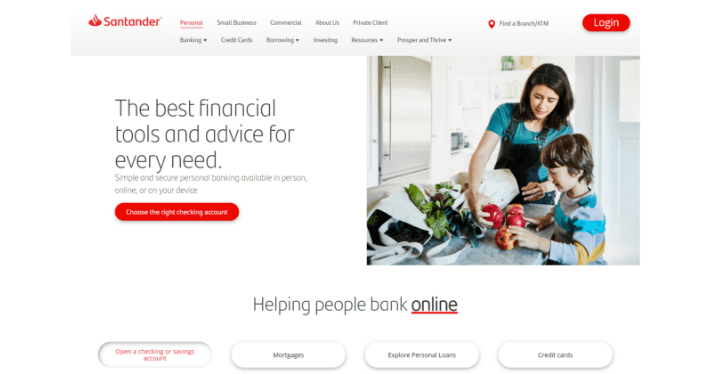
4. Santander Bank Online Banking Portal
Category: Retail Banking Portal
Santander Bank, earlier known as Sovereign Bank, is Boston-based, and its principal market is the Northeastern United States. As one of the biggest banks in the Eurozone, Santander built a new enterprise web portal website integrating their existing software systems (search engine, CMS, product catalog) while allowing room for new features and content.
The result is one of the best web portal designs in retail banking, incorporating self-service tools that allow customers to open new accounts, transfer funds, pay bills, and manage everyday banking operations without visiting a branch. Santander’s portal serves millions of users and demonstrates how portal development can transform traditional banking into a fully digital experience.
Features Integrated in Santander Bank Portal
| Feature | Description |
|---|---|
| End-to-End Encryption | All transactions and data are protected with bank-grade encryption, secure sessions, and fraud detection alerts. |
| Omnichannel Banking | Consistent experience across web, mobile app, and tablet, with synced account data across all devices. |
| Account and Card Management | One-stop dashboard for managing checking, savings, and credit card accounts with real-time balance updates and transaction history. |
| Personal Finance Management | Budget tracking tools, spending categorization, savings goal setting, and threshold alerts to help customers manage finances. |
| Integrated Bill Pay | Scheduled and one-time bill payments with payee management and automatic payment reminders. |
Just like financial portals help banks serve customers digitally, government portals bring the same self-service convenience to citizens dealing with public agencies and federal programs.
Government Portal Examples
5. Grants.gov
Category: Government Portal
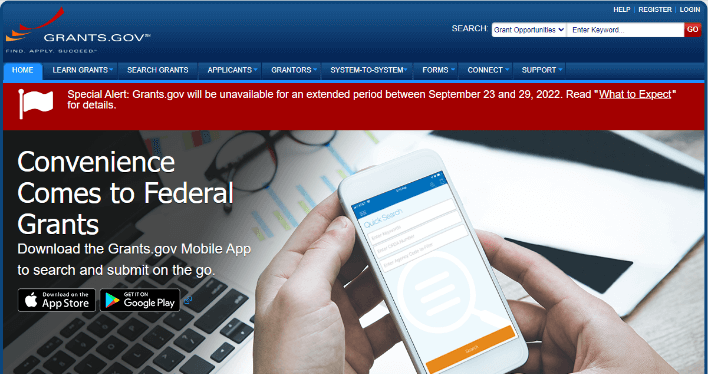
Grants.gov is one of the most recognized government portal examples in the United States. This federal government portal serves as a centralized platform where users can search, apply for, and manage federal grants online. With over 4 million page views weekly and more than 1 million email notifications sent to citizens, it is a prime portal example for how digital portals can simplify government operations.
The fully functional government portal eliminates redundancies in the grant management process and provides a streamlined experience for applicants from nonprofit organizations, educational institutions, and local governments. As a portal web application example, Grants.gov shows how a web based portal can handle millions of transactions while maintaining compliance and accessibility standards.
Features Integrated in Grants.gov
| Feature | Description |
|---|---|
| Advanced Search Function | A search bar on every page with filters for agency, category, eligibility, and funding amount, making it easy for users to find relevant grants. |
| Social Media and Blog Integration | Integrated blog and social media channels for disseminating emergency information and agency updates. Acts as a community portal where citizens can engage with agencies. |
| Accessibility Compliance | Full compliance with ADA and WCAG standards, ensuring all content is accessible to users with disabilities. |
| Events Calendar | Calendar of upcoming events, webinars, training sessions, and application deadlines to keep applicants informed. |
| Application Tracking | Real-time application status tracking, document submission management, and automated confirmation notifications. |
6. USCIS Online Portal
Category: Government Portal
The United States Citizenship and Immigration Services (USCIS) online portal is another standout among government portal examples. This portal website allows users to submit immigration petitions and applications electronically, check case status updates, and access immigration resources, all without visiting a physical office.
The USCIS portal processes millions of applications annually and has significantly reduced processing times by enabling digital document submission and automated status tracking. It is a strong portal system example of how government web portal design can improve citizen experience while reducing administrative workload.
Features Integrated in USCIS Portal
| Feature | Description |
|---|---|
| E-Filing System | Digital submission of immigration petitions, forms, and supporting documents through a secure portal. |
| Case Status Tracker | Real-time tracking of application status with automated email and SMS notifications for updates. |
| Secure Document Upload | Encrypted document upload with file validation, ensuring sensitive personal information stays protected. |
| Appointment Scheduling | Online scheduling for biometrics appointments and interviews with automatic reminders. |
| Knowledge Base and Resources | Comprehensive library of immigration guides, policy updates, and eligibility tools. |
While government portals focus on serving citizens externally, employee portals solve a similar problem internally by giving staff a single place to access HR tools, training, and company resources.
Employee and HR Portal Examples
7. AutoZone Employee Portal
Category: Employee Portal | HR Portal Example
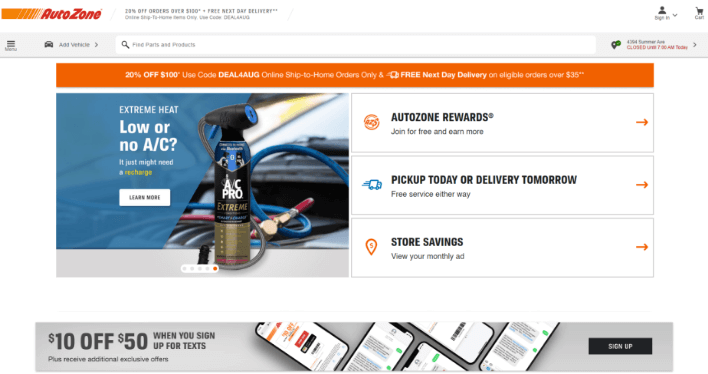
AutoZone’s employee portal, called Daily Online Communications (DOC), is one of the best employee portal examples in retail. The DOC portal serves over 47,000 store employees across the company’s locations, providing a centralized corporate portal where staff can access everything they need.
DOC is the online platform where employees find personal course information, weekly tasks, benefits details, training modules, and company news. This onboarding portal example also supports new hire onboarding with introduction packets and policy documentation.
For a deeper look at building such platforms, check out our guide on employee portal development.
Employees can customize their web portal page based on their role and location. These corporate self-service features have proven beneficial in keeping all information updated in AutoZone’s fast-moving retail environment.
Features Integrated in AutoZone Employee Portal
| Feature | Description |
|---|---|
| Onboarding and Introduction Packets | New employees receive structured onboarding content including company orientation, role-specific training, and HR documentation. Present employees can also refresh their knowledge. |
| Policies and Procedures Library | Centralized access to company values, employee handbooks, social media policies, forms, grievance procedures, and diversity policies. |
| Job Descriptions and Recruitment | Information about open positions, salary bands, performance review processes, organizational charts, and internal vacancy postings. |
| Benefits and Entitlements Management | Self-service access to benefits enrollment, wellness incentives, insurance details, retirement plan information, and annual leave management. |
| Company News and Announcements | Internal news feed publishing company updates, announcements, recognition, and events relevant to all employees. |
Employee portals streamline internal operations, but the healthcare industry has its own version of this concept. Patient portals give patients direct access to medical records, appointments, and doctor communication, reducing the burden on both staff and patients.
Patient Portal Examples
8. Forest Hills Pediatrics
Category: Patient Portal
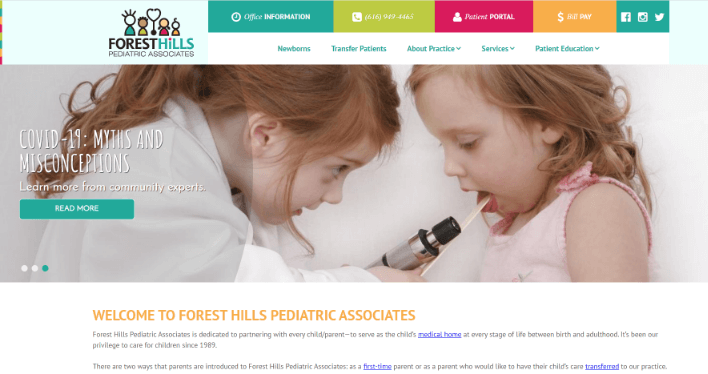
Forest Hills Pediatrics offers one of the best patient portal examples in private healthcare practice. Built by top-ranked medical professionals, this portal website provides a beautifully designed interface with a focus on accessibility and ease of use for parents and patients.
This patient portal provides self-service capabilities for requesting prescription refills, scheduling appointments, reviewing growth charts, printing immunization records, and filling out pre-visit surveys. As a user portal example, Forest Hills demonstrates how even a small medical practice can deliver an engaging, secure portal experience comparable to larger hospital systems.
Explore our patient portal development guide to learn how to build a similar solution, or read about healthcare web application development for a broader perspective.
Features Integrated in Forest Hills Pediatrics Portal
| Feature | Description |
|---|---|
| Appointment Management | Online scheduling, detailed appointment history, upcoming visit reminders, and automated appointment confirmation notifications. |
| Patient Health Information Access | Encrypted, password-protected access to health history, lab test results, discharge summaries, treatment plans, and medication records. |
| Secure Doctor-Patient Communication | HIPAA-compliant secure messaging between providers and patients, video consultation scheduling, and post-visit surveys. |
| Payment and Insurance Management | Online bill payment processing, insurance coverage details, claims tracking, and payment history. |
| Portal Administration | Administrative tools for managing user access, editing patient health records and contact information, and uploading data from vendor portals. |
9. Mayo Clinic Patient Portal
Category: Patient Portal
The Mayo Clinic Patient Portal is among the most recognized patient portal examples globally. This secure portal allows patients to view lab results, request medication refills, securely message their doctors, and manage appointments across all Mayo Clinic facilities.
What makes this a standout web portal sample is its focus on patient engagement. The portal gives patients access to their complete medical history, visit summaries, and health education resources, empowering them to take an active role in their healthcare. It is an excellent example of how portal management and thoughtful web portal design can improve both patient outcomes and provider efficiency.
Features Integrated in Mayo Clinic Patient Portal
| Feature | Description |
|---|---|
| Unified Health Record Access | Patients can view their complete medical history, lab results, imaging reports, and doctor notes from a single dashboard. |
| Prescription Management | Request refills, view current prescriptions, check medication interactions, and manage pharmacy preferences. |
| Multi-Provider Messaging | Secure messaging with multiple providers across departments, with response tracking and conversation history. |
| Visit Summary and Education | Post-visit summaries include diagnosis details, care instructions, and links to relevant health education resources. |
| Family Access | Parents and caregivers can manage health information for family members through a single authenticated portal account. |
| Looking to Develop a Patient or Healthcare Portal?Our developers specialize in HIPAA-compliant patient portal development and healthcare web application development. Let’s build a secure portal for your practice.Schedule A Call With Us |
Healthcare portals solve the patient-provider communication gap. Similarly, customer portals solve the business-client gap by giving customers a self-service hub to access resources, track orders, and engage with your brand on their own terms.
Customer Portal Examples
10. Hewlett Packard Enterprise (HPE) Partner and Customer Portal
Category: Customer Portal
Hewlett Packard Enterprise’s (HPE) partner web portal serves over 650,000 users across 174 countries, making it one of the largest customer portal examples in the technology industry. Previously, HPE struggled to deliver relevant information to each partner effectively, leading to partner disengagement.
The new portal provides a single entry point to all services, tools, marketing resources, and training materials. Since launch, 70% of partners return regularly to the portal, demonstrating how a well-built portal website can transform partner engagement. This is a powerful web portal design example that shows how personalization and centralized access drive real business results. If you are exploring similar solutions, read our guide on customer portal development.
Features Integrated in HPE Portal
| Feature | Description |
|---|---|
| Role-Based Personalization | Content and tools are dynamically tailored based on partner type, region, and engagement level. |
| Training and Certification Hub | Access to partner training courses, certification programs, and skill development resources. |
| Marketing Resource Library | Downloadable marketing materials, co-branding tools, and campaign assets for partner use. |
| Deal Registration and Tracking | Partners can register deals, track approval status, and manage their sales pipeline through the portal. |
| Performance Dashboards | Real-time dashboards showing sales performance, incentive progress, and business analytics. |
Customer portals improve the front-end relationship with your clients. But what about the back-end? Vendor portals do the same for your supply chain by giving suppliers a dedicated platform to manage orders, invoices, and procurement workflows.
Vendor and Supplier Portal Examples
11. Daimler Truck Supplier Portal
Category: Vendor Portal | Supplier Portal Example
Daimler Truck’s supplier portal is one of the best vendor portal examples in the manufacturing industry. This secure portal provides a centralized environment for collaboration between Daimler and its global network of suppliers, streamlining procurement processes and improving supply chain efficiency.
The portal facilitates vendor onboarding, purchase order management, invoice submission, quality documentation, and communication, all through a single portal website. As a vendor portals example, Daimler demonstrates how large enterprises can manage complex supplier relationships through a well-designed web based portal. For a step-by-step approach, read our guide on custom vendor portal development.
Features Integrated in Daimler Supplier Portal
| Feature | Description |
|---|---|
| Vendor Onboarding and Registration | Structured onboarding process with document submission, compliance verification, and qualification workflows. |
| Purchase Order Management | Suppliers can view, confirm, and track purchase orders with real-time status updates and delivery scheduling. |
| Invoice and Payment Processing | Digital invoice submission, approval tracking, and payment status visibility to streamline accounts payable. |
| Quality Management | Tools for submitting quality documentation, managing non-conformance reports, and tracking corrective actions. |
| Supplier Communication Hub | Centralized messaging and notification system for procurement updates, policy changes, and collaboration. |
Vendor portals optimize the supply chain side of business. When you combine that with a customer-facing storefront, you get eCommerce portals, platforms that power entire online marketplaces and seller ecosystems.
eCommerce Portal Examples
12. Amazon Seller Central
Category: eCommerce Portal
Amazon Seller Central is one of the most well-known eCommerce portal examples in the world. This portal web application serves millions of sellers globally, providing them with a complete platform to list products, manage inventory, process orders, and analyze sales performance.
The portal includes tools for advertising, fulfillment management, customer communication, and financial reporting, all within a single web portal website. It is a prime portal business model example showing how a well-engineered online web portal can power an entire marketplace ecosystem.
To build your own, either explore our eCommerce portal development guide or our eCommerce portal development services.
Features Integrated in Amazon Seller Central
| Feature | Description |
|---|---|
| Product Listing Management | Tools to create, edit, and optimize product listings with images, descriptions, keywords, and pricing. |
| Inventory and Fulfillment Tracking | Real-time inventory levels, FBA (Fulfillment by Amazon) management, and shipping status tracking. |
| Sales Analytics Dashboard | Detailed sales reports, traffic analytics, conversion rates, and revenue breakdowns by product and period. |
| Advertising Console | Integrated advertising tools for creating sponsored product campaigns, setting budgets, and tracking ad performance. |
| Customer Communication | Buyer-seller messaging system for handling inquiries, returns, and feedback within the portal. |
| Need Help Building an eCommerce or Vendor Portal?We develop custom eCommerce portals and vendor portals that automate procurement, seller management, and order workflows.Get a Free Consultation |
eCommerce portals connect sellers with buyers. But for companies that rely on a network of resellers, consultants, or distributors, partner portals take collaboration to the next level.
Partner Portal Examples
13. Microsoft Partner Network Portal
Category: Partner Portal
The Microsoft Partner Network portal is a standout among portal website examples for partner collaboration. This portal serves as a centralized hub for Microsoft’s global network of partners, providing access to essential resources, training materials, marketing tools, and business management capabilities.
Partners can earn competency badges, access technical pre-sales support, co-sell with Microsoft, and track their performance against program requirements. As a portal sites example, the Microsoft Partner Network demonstrates how web portal management can drive mutual growth between a platform company and its partner ecosystem. If you are building a B2B collaboration platform, explore our B2B portal development services.
Features Integrated in Microsoft Partner Network Portal
| Feature | Description |
|---|---|
| Competency and Learning Paths | Structured learning paths with certifications that partners can complete to earn competency badges and unlock benefits. |
| Co-Sell Marketplace | Platform for partners to collaborate with Microsoft sales teams on joint opportunities and deal registration. |
| Marketing Campaign Builder | Tools for creating co-branded marketing campaigns with downloadable assets and campaign tracking. |
| Business Performance Analytics | Dashboards showing revenue, customer acquisition, and program compliance metrics in real time. |
| Technical Pre-Sales Support | Access to Microsoft engineers and technical resources for solution design and customer demonstrations. |
Partner portals strengthen external business relationships. For large organizations, the same need exists internally. Corporate intranet portals unify communication, training, and collaboration across thousands of employees under one roof.
Intranet and Corporate Portal Examples
14. JPMorgan Chase Corporate Intranet
Category: Intranet Portal | Corporate Portal
JPMorgan Chase operates one of the most extensive intranet portal systems in the financial services industry. Their corporate portal serves as a central hub for over 290,000 employees worldwide, providing access to company news, training materials, HR self-service tools, internal communications, and collaboration features.
This corporate portal demonstrates how a well-designed network portal can unify communication across a massive, global workforce. It is a top portal system example showing how portal management at enterprise scale requires deep integration with HR systems, learning management platforms, and internal communication tools. Read our guide on enterprise portal development to learn how to build similar solutions.
Features Integrated in JPMorgan Chase Intranet
| Feature | Description |
|---|---|
| Employee Self-Service Hub | Access to payslips, tax documents, benefits enrollment, PTO requests, and HR case management without contacting HR directly. |
| Internal News and Communications | Personalized news feed with company announcements, leadership messages, and department-specific updates. |
| Learning and Development Platform | Integrated training catalog with mandatory compliance courses, skill development programs, and certification tracking. |
| Collaboration and Social Tools | Internal forums, team workspaces, and social networking features that promote cross-departmental collaboration. |
| Document and Knowledge Management | Centralized repository for policies, procedures, templates, and institutional knowledge with advanced search functionality. |
While corporate intranets connect people within a company, community portals take a broader approach by connecting people who share a common location, interest, or purpose.
Community Portal Examples
15. Nextdoor Community Portal
Category: Community Portal
Nextdoor is the leading community portal connecting neighbors and local communities worldwide. This online portal allows residents to share local recommendations, post about safety concerns, organize events, buy and sell items, and stay informed about neighborhood happenings.
As a popular web portal example, Nextdoor demonstrates how digital portals can build meaningful connections between people in the same geographic area. It serves as both an information portal and a social platform, making it a unique entry on this list of web portals.
Features Integrated in Nextdoor Portal
| Feature | Description |
|---|---|
| Neighborhood-Based Access | Users are verified by address and connected to their specific neighborhood, ensuring content relevance and trust. |
| Local Business Directory | A portal for local businesses to create profiles, post offers, and receive recommendations from community members. |
| Safety and Emergency Alerts | Real-time safety alerts, crime reports, and emergency notifications shared within the community. |
| Events and Community Groups | Tools for creating neighborhood events, interest-based groups, and volunteer coordination. |
| Marketplace | Local buying and selling marketplace restricted to verified community members for safer transactions. |
| Ready to Build a Custom Web Portal for Your Business?Whether you need a customer portal, employee portal, vendor portal, or any other type of portal, our experienced developers can build it from scratch. Tell us your requirements and get a free project estimate.Let’s Get In Touch |
The 15 examples above show what successful portals look like in practice. But what separates a good portal from a great one? It all comes down to design and user experience. Let’s break down the principles that make these portals work.
Web Portal Design Best Practices for Better User Experience
The success of any web portal depends heavily on its web portal design and user experience. Whether you are building a customer portal, corporate portal, vendor portal, or government portal, thoughtful portal website design ensures users can easily access relevant information, complete tasks efficiently, and enjoy a personalized experience.Here are the key principles behind effective web portal designs:
Clear Navigation and Information Architecture
Users should find what they need within two to three clicks. Logical menu structures, breadcrumbs, and contextual links reduce friction and improve satisfaction. The best web portal design examples prioritize simplicity over complexity.
Responsive and Mobile-First Design
A modern web portal must function seamlessly across desktops, tablets, and mobile devices. With over 60% of web traffic coming from mobile devices, responsive web portal designing is not optional but essential.
Robust Search Functionality
A powerful search bar with filters, auto-suggestions, and faceted search helps users quickly locate documents, services, or information within the portal.
Role-Based Personalization
Effective portal web design delivers different content and tools based on the user’s role. A customer sees order history while an employee sees HR resources, all within the same portal platform.
Accessibility and Compliance
All portal websites should comply with ADA and WCAG accessibility standards, ensuring content is accessible to users with disabilities. This is especially critical for government and healthcare web development portals.
Integration with Existing Systems
The best portal sites integrate seamlessly with CRM, ERP, HRIS, and other backend systems through APIs, providing real-time data without manual data entry.
Performance and Load Speed
Portal sites handling thousands of concurrent users must be optimized for fast load times. Slow portals lead to user abandonment and reduced engagement. For a deeper dive into UX principles, read our guide on user experience in web development.
Now that you understand the design principles behind great portals, let’s walk through the actual process of building one from the ground up.
How to Create a Web Portal Step by Step
Building a web portal is not just a technical task — it is a strategic process that requires clear planning, informed decisions, and the right execution at each stage. The steps below walk you through everything from defining your goals to managing the portal post-launch.
Step 1: Define your goals and audience
Every successful portal begins with clarity. Before writing a single line of code, identify who will use the portal — whether that is customers, employees, vendors, or students — and define the specific tasks they need to accomplish. This clarity determines the type of portal you need and the features that belong in it.
Step 2: Choose your portal type
Once your goals are defined, select the portal type that best fits your use case. Options include customer portals, employee portals, vendor portals, or a combination of these. Choosing the right type early ensures the design, access controls, and feature set are built with the right users in mind from the start.
Step 3: Plan the information architecture
Information architecture is the foundation of a usable portal. Map out the navigation structure, user roles, content hierarchy, and key workflows before development begins. This step directly influences the quality of your web portal’s interface and overall user experience — getting it right here saves significant rework later.
Step 4: Select the technology stack
The technology you choose affects everything — performance, scalability, security, and long-term maintainability. Evaluate your options across development frameworks, databases, hosting infrastructure, and third-party integrations. Also decide whether a custom-built portal or an existing portal platform better fits your timeline, budget, and technical requirements.
Step 5: Design and develop the portal
With architecture and technology in place, development begins. Build the portal with a focus on responsive design, strong security, personalization features, and accessibility standards. Following web portal design best practices at this stage ensures that users have a consistent, reliable experience across all devices and roles.
Step 6: Test thoroughly before launch
Testing is not a final checkbox — it is a critical quality gate. Conduct functionality testing, security testing, performance testing, and user acceptance testing (UAT) before going live. Catching issues at this stage is significantly less costly than resolving them after launch.
Step 7: Iterate and improve after launch
A portal launch is a starting point, not a finish line. After going live, continuously gather user feedback and monitor analytics to identify friction points and improvement opportunities. The portals that deliver the most long-term value are those that evolve alongside their users’ needs.
Knowing how to set up a portal gives you a strong foundation, but ongoing portal management is what drives sustained value. If you need expert guidance through any of these stages — from planning to launch — browse the top web portal development companies to find the right partner for your project.
Need a Development Partner for Your Web Portal Project?
From planning and design to development and launch, we handle every stage of web portal development. Get a free cost estimate and project timeline for your custom portal.
Still have questions about web portals? Here are the most common ones we get from businesses planning their first portal.
Build a Web Portal That Works for Your Business
The 15 web portal examples in this guide show one clear pattern: every successful portal solves a specific problem for a specific audience.
Stanford’s student portal simplifies academic management for thousands of users. Grants.gov processes millions of federal grant applications without requiring citizens to visit an office. Amazon Seller Central powers an entire marketplace ecosystem through one platform. Mayo Clinic’s patient portal puts healthcare access directly in the hands of patients.
What makes these examples of web portals work is not the technology alone. It is the combination of the right type of web portal, a user-first web portal design, strong security, and self-service features that reduce workload on both sides.
Here is what to take away from these examples if you are planning your own portal:
- Pick the right portal type. A customer portal, employee portal, and vendor portal each solve different problems. Match your portal to the audience it will serve.
- Invest in design and usability. The best web portals make complex tasks feel simple. If users struggle to navigate your portal, they will not come back.
- Start with must-have features, then expand. Every portal on this list started with core functionality and added features over time. You do not need to build everything at once.
- Prioritize security from day one. Whether you are handling patient records, financial data, or supplier contracts, a secure portal with authentication and encryption is non-negotiable.
- Work with experienced portal developers. Building a portal that scales, performs, and integrates with your existing systems requires technical expertise.
At Monocubed, we have helped businesses across healthcare, education, eCommerce, finance, and enterprise build custom web portals that deliver real results. Whether you need a patient portal, an eCommerce portal, an employee portal, or a vendor portal, our team handles everything from planning and design to development and launch.
Ready to build your web portal? Get in touch with our portal development team for a free consultation and project estimate.
Frequently Asked Questions About Web Portals
-
What is a web portal?
A web portal is a secure, web based platform that provides authenticated users with personalized access to information, services, and tools from a single interface. The web portal definition centers on its ability to aggregate content from multiple sources and deliver a tailored experience based on the user’s role, preferences, and permissions. Unlike a regular website, a web portal requires login credentials and offers interactive features like self-service dashboards, collaboration tools, and real-time data. The portal meaning encompasses everything from a student checking grades on a university portal to an employee accessing HR resources on a corporate intranet.
-
What is the difference between portal and website?
The key difference between portal and website lies in personalization and authentication. A website is a public platform that displays the same content to all visitors, primarily used for marketing, branding, and information sharing. A portal website, on the other hand, requires users to log in and delivers customized content, tools, and services based on their role and permissions. The portal and website difference also extends to functionality: websites are mainly read-only, while web portals enable two-way interaction such as data submission, task management, and collaboration. For a detailed comparison, read our guide on web portal vs website.
-
What are some examples of top web portals?
Examples of top web portals span every industry. Some of the best web portals include Stanford University (education portal), Allianz Wealth Management (financial portal), Grants.gov (government portal), Mayo Clinic (patient portal), Amazon Seller Central (eCommerce portal), Microsoft Partner Network (partner portal), and JPMorgan Chase Intranet (corporate portal). The popular web portals list also includes Nextdoor (community portal), HPE Partner Portal (customer portal), and Daimler Truck (vendor portal). Each of these portal examples demonstrates a different type of web portal serving a specific audience.
-
What are the types of web portals?
The main types of web portals include customer portals, employee portals, vendor portals, patient portals, education portals, government portals, financial portals, eCommerce portals, partner portals, intranet portals, community portals, information portals, and job portals. Each type of portal serves a different audience and purpose, but all share common characteristics like authenticated access, personalization, and centralized service delivery. This web portals list covers the most commonly used types of portals in modern business.
-
What is a student portal?
A student portal is an education portal that provides students with centralized access to academic resources, course materials, grades, enrollment tools, financial aid information, and communication features. Student portal examples include Stanford University’s AXESS system and Khan Academy’s learning platform. A school portal example typically serves students, faculty, parents, and administrators through role-based access, ensuring each user sees only the information relevant to them. These educational portals examples and learning portal examples have become essential in modern education.
-
What is a partner portal?
A partner portal is a custom web portal that organizations create to collaborate with and support their business partners. Partners use the portal to access marketing materials, training resources, deal registration tools, performance dashboards, and co-selling opportunities. Examples include the Microsoft Partner Network and HPE Partner Portal. The partner portal improves collaboration, ensures partners have easy access to the latest resources, and strengthens the business relationship through transparency and self-service capabilities.
-
What is a vendor portal?
A vendor portal is an online portal created by companies to streamline collaboration with their suppliers and third-party vendors. Through a vendor portal, suppliers can manage purchase orders, submit invoices, track payments, upload compliance documents, and communicate with procurement teams. Vendor portal examples like Daimler Truck’s supplier portal demonstrate how these portal sites can reduce procurement costs, speed up vendor onboarding, and improve supply chain visibility.
-
How to create a web portal?
To create a portal, start by defining your target audience and their needs, then choose the appropriate portal type (customer, employee, vendor, etc.). Next, plan the information architecture, select your technology stack, and design with a focus on user experience, security, and personalization. The development phase involves building the portal’s frontend, backend, and integrations, followed by thorough testing. After launch, continuous portal management and iteration based on user feedback ensure the portal remains effective. For a step-by-step walkthrough, read our detailed guide on how to create a web portal. If you need professional help with portal development, contact a web portal development company with experience in building custom portal solutions.
-
What is a web portal useful for?
Web portals are useful for centralizing access to information, enabling self-service, improving collaboration, and automating routine tasks. Businesses use web portal sites to reduce support costs, improve customer satisfaction, streamline operations with partners and suppliers, and provide employees with a single platform for all their work-related needs. The portal service capabilities extend to healthcare (patient portals), education (student portals), government (citizen portals), finance (banking portals), and virtually every industry that needs to deliver personalized, secure digital experiences.
-
How many types of web portals are there?
There are over a dozen commonly recognized types of web portals, including customer portals, employee portals, vendor or supplier portals, patient portals, education or student portals, government portals, financial or banking portals, eCommerce portals, partner portals, intranet portals, community portals, information portals, news portals, job portals, application portals, and admission portals. The exact count varies depending on how granularly you categorize them, but this internet portals list covers the main categories used across industries.

 All our projects are secured by NDA


