
 By Yuvrajsinh Vaghela
Modern businesses rely on multiple applications, databases, and digital services to manage operations, customer interactions, and internal workflows.
However, accessing these systems separately often creates data silos, slows decision-making, and increases support overhead. As organizations scale, they need a centralized, secure, and personalized access layer that simplifies how users interact with business systems.
Web portals address this challenge by acting as unified digital gateways that allow specific user groups such as customers, employees, partners, or members to securely access tools, services, and information from a single interface.
The web portal market is projected to reach nearly USD 12.8 billion by 2033 at a CAGR of 10.6% from 2026 to 2033, as organizations increasingly invest in solutions that improve operational efficiency, enable self-service capabilities, and enhance user engagement.
Being a custom web portal development company, we have in-depth understanding of web portal development. We’ve created this guide for business owners, CTOs, and product managers evaluating web portals for their organization. If you need to centralize operations, improve customer self-service, or reduce support costs, understanding web portals is the first step toward building scalable digital infrastructure.
Table of Content
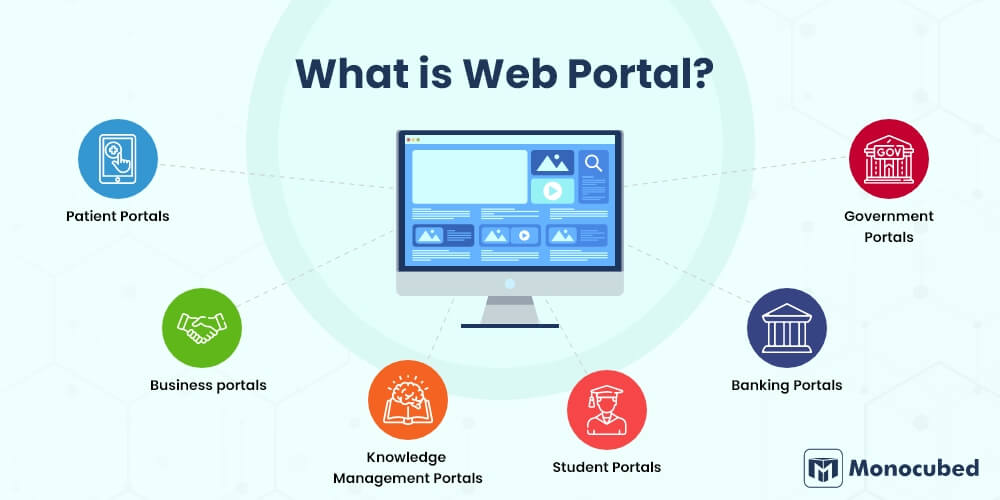
What is Web Portal?
A web portal is a secure, web-based platform that aggregates information, applications, and services from multiple sources into a single personalized interface for authenticated users.
Web portals are designed to deliver role-based access, allowing users such as customers, employees, partners, or members to interact with business tools, data, and services through one centralized environment. These platforms are accessible across multiple devices, including desktops, tablets, and smartphones, ensuring seamless user interaction.
Web portals are also known as portal websites, portal sites, web gateways, intranet portals, or enterprise portals, depending on their functionality and target users.
The core concept of a web portal revolves around providing personalized and secure access tailored to individual user roles. For example, in an organization with multiple departments, employees may receive customized dashboards that allow them to manage tasks, access internal systems, and monitor workflows relevant to their responsibilities.
3 Key strength of web portals
- Integration: Web portals connect multiple business systems, databases, and third-party applications into a unified platform. This eliminates the need for users to switch between different tools, improving workflow efficiency and data accessibility.
- Consistency: Portals provide a standardized interface and user experience across departments and systems. This consistency reduces training time, minimizes user confusion, and improves overall productivity.
- Personalization: Web portals deliver customized content, dashboards, and features based on user roles, preferences, and permissions. Personalized experiences improve engagement while ensuring users only access relevant data and tools.
Now that you understand the fundamentals of web portals, let’s explore how they work and why they play a critical role in modern digital ecosystems.
What’s the Key Difference Between Web Portal and Website ?
Although both websites and web portals operate through web browsers, they serve different business objectives and user experiences. Understanding the distinction helps organizations choose the right platform based on their operational needs, user interaction requirements, and security expectations.
Here is the quick table of web portal vs website:
| Feature | Website | Web Portal |
|---|---|---|
| Access | Open to the public. Visitors can browse without logging in. Designed for maximum visibility and reach. | Requires login credentials. Access is controlled and often role-based (admin, employee, vendor, customer). |
| Content | Same content for all users. Pages are standardized and not personalized. | Personalized dashboards, data, and tools based on user profile and permissions. |
| Purpose | Inform, promote, and generate leads. Focused on brand presence and marketing. | Serve specific user groups and streamline workflows, collaboration, and data exchange. |
| Interaction | Mostly one-way communication. Users read content, submit forms, or view information. | Two-way engagement. Users upload files, approve requests, track orders, manage accounts, or collaborate. |
| Security | Basic security measures like SSL encryption. Limited handling of sensitive user-specific data. | Advanced security including SSO, MFA, role-based access control (RBAC), encryption, and audit tracking. |
| Examples | Company website, blog, landing page, portfolio site. | Patient portal, employee intranet, vendor portal, B2B customer dashboard. |
A website is typically used to provide general information about a business, product, or service to a broad audience. It focuses on brand visibility, marketing communication, and lead generation, where visitors primarily consume content.
A web portal, on the other hand, is designed to deliver personalized experiences and facilitate user interactions such as collaboration, transactions, workflow management, or service access. Organizations implement portals when they need secure, role-based environments for customers, employees, vendors, or partners.
If you want to explore the technical, functional, and business-level distinctions in greater depth, check out our detailed web portal vs website comparison.
How Does a Web Portal Work?
A web portal functions as a centralized platform that connects users with multiple systems, services, and data sources through a secure and personalized interface. While the front-end experience appears simple and unified, the backend of a web portal involves several coordinated processes that ensure secure access, real-time data retrieval, and seamless user interaction.
Additionally, It is important to understand its functionality before starting the web portal development process.
Step 1: User accesses the web portal
The process begins when a user visits the portal through a designated URL. Instead of directly displaying information, the portal typically presents a login screen. This ensures that only authorized users can access sensitive tools, data, or services available within the web portal platform.
Step 2: Authentication and identity verification
Once the user enters login credentials, the portal verifies their identity through authentication mechanisms. This can include traditional username and password combinations, Single Sign-On (SSO) for accessing multiple enterprise applications using one login, or Multi-Factor Authentication (MFA) for additional security through verification codes or biometric validation.
Step 3: Role and permission identification
After authentication, the portal identifies the user’s role and access permissions. For example, administrators, employees, partners, or customers may all access the same portal but receive different levels of visibility and functionality. This role-based access control ensures users can only view and interact with relevant information while maintaining data security and compliance.
Step 4: Personalized dashboard and data aggregation
Once permissions are verified, the portal generates a personalized dashboard by pulling information from multiple backend sources. These sources may include internal databases, cloud platforms, APIs, and third-party business applications such as CRM systems, analytics tools, or document management software. The portal consolidates this data into a single interface, enabling users to access everything they need without switching between systems.
Step 5: User interaction and task execution
Users can then interact with the portal to complete various tasks, such as viewing reports, submitting forms, scheduling appointments, communicating with teams, or processing transactions. These interactive features help streamline workflows and improve operational efficiency across departments and user groups.
Step 6: Activity monitoring and security logging
Every action performed within the portal is logged and monitored for security, compliance, and performance tracking. Logging helps organizations maintain audit trails, detect suspicious activity, and ensure data integrity, which is particularly critical in regulated industries such as healthcare, finance, and government services.
Which Are the Basic Types of Web Portals?
Now that we understand what web portals are, it is important to explore their different types. Web portals can be broadly categorized into vertical web portals and horizontal web portals, but modern enterprise ecosystems also include several specialized portal categories designed for specific business needs and user groups.
Here is the list of different types of web portals that you can design based on your business needs and customers:
1. Vertical web portals
Vertical web portals focus on specific industries, departments, or business functions such as finance, CRM, service management, or internal operations. These portals are designed to support specialized workflows and provide targeted functionality tailored to a defined audience.
Vertical portals allow users such as employees, students, or patients to securely access, update, and manage information relevant to their roles. These portals often integrate with business tools like ERP systems, HR software, and healthcare management platforms.
Common examples include:
- Student portals for managing academic information and course access
- Employee portals for internal communication and workflow management
- Patient portals for appointment scheduling and medical record access
2. Horizontal web portals
Horizontal web portals provide users with aggregated data and services from multiple systems through a single unified interface. These portals serve broader audiences and focus on delivering centralized access to information across departments or services.
Horizontal portals are typically used for knowledge sharing, enterprise collaboration, and public service delivery.
Examples include:
- Government citizen service portals
- Enterprise knowledge management portals
- Corporate intranet platforms connecting multiple departments
3. Intranet portals
Intranet portals are internal platforms designed exclusively for employees. They help organizations streamline communication, document sharing, workflow automation, and collaboration across departments.
These portals often integrate HR systems, training modules, project management tools, and company resources to improve employee productivity and engagement.
Learn more about building internal workforce solutions in our employee portal development guide
4. Extranet portals
Extranet portals extend secure access to external stakeholders such as vendors, suppliers, distributors, and business partners. These portals enable organizations to collaborate with external users while maintaining controlled access to data and business processes.
Extranet portals commonly support supply chain management, partner collaboration, and vendor communication workflows.
5. Self-service portals
Self-service portals allow customers, employees, or partners to independently access services, resolve queries, and manage transactions without direct support from service teams. These portals help reduce operational workload while improving user satisfaction.
Typical self-service features include account management, ticket submission, document access, and service tracking.
Explore implementation strategies in our customer portal development guide.
6. B2B customer portals
B2B portals are designed to support digital commerce and business collaboration between companies. These portals allow clients to place orders, track shipments, manage invoices, and access account-specific pricing or product catalogs. The demand for B2B portals development continues to grow, with Gartner reporting that 83% of B2B buyers prefer digital commerce channels over traditional sales interactions.
7. Community portals
Community portals focus on building user engagement through shared interests, discussions, and collaborative knowledge exchange. These portals typically include forums, content-sharing platforms, and networking features that foster user participation and brand loyalty. They are commonly used by professional communities, educational networks, and interest-based user groups.
8. E-Commerce portals
E-commerce portals enable businesses to deliver personalized online shopping experiences, especially for multi-vendor marketplaces, B2B commerce platforms, or subscription-based services. Ecommerce portals are developed with product catalogs, payment gateways, order tracking, and customer account management.
Find Out Which Type of Web Portal You Should Build
Not sure whether you need a customer portal, B2B platform, employee dashboard, or enterprise solution? Monocubed’s expert web developers help you define the right portal architecture, features, and technology stack — aligned with your business goals.
8 Most Popular Examples of Web Portals
Web portals are widely used across industries to simplify operations, improve user experience, and enable secure digital interactions. Below are some of the best web portals examples used by organizations worldwide.
-
Patient web portals
Patient portals allow healthcare users to securely access and manage their medical information online. These portals enable patients to track doctor visits, view prescriptions, download lab reports, schedule appointments, access digital health records, and communicate directly with healthcare providers.
Modern healthcare organizations increasingly invest in dedicated patient portal development solutions to deliver secure and compliant digital patient experiences.
Example: One of the most widely used patient portal platforms in the United States is Epic MyChart, which allows patients to manage their healthcare data through a secure digital interface. -
Business Portals
Business portals provide centralized platforms that allow organizations to manage corporate services, compliance processes, partner registrations, and operational workflows. These portals help businesses streamline communication, automate administrative tasks, and improve collaboration between stakeholders.
A well-known example is the Salesforce Partner Portal, which allows companies to manage partner relationships, share resources, and track business opportunities in one unified system.
-
Knowledge Management Portals
Knowledge management portals help organizations centralize documentation, training materials, internal resources, and collaborative content. These portals allow employees, partners, and stakeholders to access structured business knowledge, improving productivity and reducing information silos.
Many enterprises implement structured knowledge management systems to maintain organizational knowledge and support decision-making processes.
A popular example is Confluence by Atlassian, which organizations use to manage documentation, project collaboration, and knowledge sharing across teams.
-
Student Portals
Student portals provide educational institutions with digital platforms where students can manage academic activities. These portals allow students to enroll in courses, submit assignments, check examination results, download academic records, and access campus announcements.
Leading learning management platforms such as Blackboard and Canvas LMS are widely used by schools and universities to deliver student portal experiences.
-
Banking Portals
Banking portals enable customers to manage financial services securely through online platforms. These portals allow users to check account balances, transfer funds, view transaction history, pay bills, and access financial statements.
Advanced banking portals also use role-based security to ensure sensitive financial data remains protected.
Examples of widely recognized banking portals include Chase Online Banking and HDFC NetBanking, both of which provide customers with secure and comprehensive digital banking services.
-
Government Portals
Government portals provide citizens, businesses, and public sector employees with centralized access to public services and official information. These portals support multiple service models, including citizen-to-government (C2G), government-to-citizen (G2C), government-to-business (G2B), and government-to-employee (G2E) interactions.
Examples include USA.gov, which offers centralized access to federal government services in the United States, and India’s DigiLocker, which allows citizens to store and access official documents digitally.
-
Employee Portals
Employee portals, often referred to as intranet or employee self-service portals, help organizations streamline internal communication and workforce management. Businesses implementing internal workforce platforms often rely on custom employee portal development to improve productivity and employee engagement.
Platforms such as Microsoft SharePoint and BambooHR are widely used employee portal solutions that help organizations manage workforce operations efficiently.
-
Custom vendor portals
Vendor portals, also known as supplier portals, help organizations collaborate with external vendors, suppliers, and service providers. These portals allow vendors to manage purchase orders, track shipments, submit invoices, communicate with procurement teams, and participate in tender processes.
Many enterprises deploy custom vendor portal development solutions to strengthen supplier collaboration and procurement efficiency.
Popular vendor portal platforms include SAP Ariba and Coupa, which help businesses streamline supplier relationship management.
So, we have discussed the top web portal examples in the above section. Do you know the advantages of using these best web portal platforms? Check below to know the top 5 advantages of web portals.
8 Top Advantages of Using a Web Portal for Your Business
Organizations across industries implement web portals to streamline operations, improve user engagement, and enhance service delivery. Below are the most impactful and measurable web portal benefits for your business.
-
Centralized information access
Web portals consolidate data, tools, and services from multiple systems into a single unified dashboard. Instead of switching between different applications, users can access everything through one platform, improving workflow efficiency and reducing operational friction.
-
24/7 access from any device
Modern web portals provide secure access across desktops, tablets, and mobile devices, allowing users to complete tasks anytime and anywhere. This flexibility supports remote work, global collaboration, and faster service delivery. According to workplace productivity studies, mobile and remote accessibility significantly improves employee responsiveness and operational continuity, especially in distributed workforce environments.
-
Improved collaboration and communication
Web portals strengthen collaboration by providing built-in communication and workflow management features such as real-time messaging, document sharing, task assignment, project tracking, and team discussion channels. These collaborative capabilities help organizations streamline internal operations, reduce email dependency, and improve cross-department coordination.
-
Enhanced security and access control
Security is one of the strongest advantages of web portals. These platforms implement advanced protection mechanisms such as Single Sign-On (SSO), Multi-Factor Authentication (MFA), role-based access control (RBAC), and data encryption. These features ensure sensitive information is only accessible to authorized users while supporting compliance with industry regulations such as HIPAA, GDPR, and financial security standards.
-
Reduced support costs through self-service
Web portals empower users to independently access information, resolve issues, and complete transactions without relying heavily on support teams. Industry benchmarks indicate that self-service portals can reduce customer support ticket volume by 25–40%, allowing organizations to lower operational costs while improving user satisfaction.
-
Cost savings and operational efficiency
By automating repetitive processes such as document approvals, service requests, and workflow management, web portals reduce administrative overhead and manual intervention.
Automation helps businesses streamline operations, optimize resource allocation, and lower overall operational expenses. -
Data-driven insights and analytics
Web portals provide valuable analytics by tracking user behavior, service usage patterns, and performance metrics. These insights help businesses identify operational bottlenecks, improve service delivery, and make strategic decisions based on real-time data.
-
Personalized user experience
Web portals deliver customized dashboards, content, and features based on user roles, preferences, and activity history. Personalized experiences improve engagement, increase user satisfaction, and ensure individuals only access relevant information and services.
After advantages, there is another important part of a web portal which is its features. Let us understand the top features of a web portal before you learn about how to build a web portal.
Want to Develop Web Portal for Your Business?
We have built more than 50 web solutions and provide engaging web development solution for your business.
After advantages, there is another important part of a web portal which is its features. Let us understand the top features of a web portal:
10 Key Features for Modern Web Portal Development
Here are the top 10 key web portal features to take into consideration while developing a web portal for your business.
-
Interactive Home Page
The homepage should be intuitive and engaging, offering users quick access to important sections. Features like dynamic content blocks, personalized widgets, and activity summaries improve usability. For portals handling large datasets, AI can optionally highlight the most relevant tasks or updates for each user.
-
User Personalization
Personalize portal content based on user roles, preferences, and past activity. This includes customized dashboards, relevant notifications, and context-aware shortcuts. Machine learning can enhance personalization over time, suggesting content or tools that a user frequently needs.
-
Dashboard and Analytics
Dashboards provide an overview of key updates, tasks, and metrics. Integrating analytics helps track user behavior, resource usage, and operational KPIs. AI-powered insights, such as predictive trends or anomaly detection, can support data-driven decision-making.
-
. Role-Based Access Control (RBAC)
Grant granular permissions to users or groups to protect sensitive data. RBAC ensures users only access what they need, improving security and compliance. AI can be optionally used to monitor access patterns and detect suspicious activity.
-
Authentication and Single Sign-On (SSO)
Secure portals with single sign-on and multi-factor authentication. This simplifies login for users while ensuring robust security. AI-based threat detection can optionally flag unusual login behavior to prevent breaches.
-
Document management
Provide secure storage, version control, and controlled sharing of documents. Features like audit trails, automated categorization, and easy retrieval are essential. AI can assist with intelligent tagging, content search, and detecting outdated or duplicate files.
-
Knowledge base and self-service tools
Offer a centralized resource hub with FAQs, guides, and tutorials. Users can resolve issues independently, reducing support load. AI-driven search or chatbots can improve self-service by suggesting relevant articles or resources.
-
Workflow automation
Automate repetitive tasks such as approvals, notifications, and task routing. This ensures efficiency and reduces errors. AI can optionally optimize workflows by predicting bottlenecks or prioritizing tasks.
-
API & third-party integrations
Enable seamless connections with CRM, ERP, payment gateways, communication tools, and other systems. Integration allows data to flow smoothly between platforms and improves overall portal utility. AI analytics can provide deeper insights when multiple systems are combined.
-
White-label customization
Allow custom branding, logos, and domain names to align the portal with your company identity. Advanced customization options can include configurable layouts, themes, and feature sets. AI personalization can dynamically adjust layouts or content for different user segments if needed.
How to Create a Web Portal: Step-by-Step Development Process
Building a web portal requires a structured approach that covers business analysis, technical planning, design, development, testing, and deployment. Below is a step-by-step overview of the web portal development process.
Step 1: Define business objectives and user requirements
Start by identifying the core purpose of your portal — whether it is customer self-service, employee collaboration, vendor management, or partner communication. Document user roles, expected workflows, data sources, and integration requirements. Clear business objectives help ensure the portal aligns with organizational goals from the start.
Step 2: Choose the technology stack
Based on your requirements, determine the type of portal you need (intranet, extranet, self-service, B2B, e-commerce, etc.) and select the appropriate technology stack.
Common technologies used for web portal development include:
| Category | Technologies |
|---|---|
| Frontend | React, Angular, Vue.js |
| Backend | Node.js, Python (Django/Flask), PHP (Laravel), Java (Spring Boot), .NET |
| Database | PostgreSQL, MySQL, MongoDB |
| Cloud & Hosting | AWS, Azure, Google Cloud |
| Authentication | OAuth 2.0, SAML, OpenID Connect |
Step 3: Plan information architecture and user flows
Map out the portal’s structure, including navigation hierarchy, dashboard layouts, role-based views, and content organization. Define user flows for key actions such as login, data access, form submissions, and task completion. A well-planned information architecture improves usability and reduces development rework.
Step 4: Design UI/UX with accessibility in mind
Create wireframes and interactive prototypes before moving to development. Portal design should prioritize clarity, ease of navigation, and responsiveness across devices. Follow accessibility standards (WCAG 2.1) to ensure the portal is usable for all users, including those with disabilities.
Step 5: Develop, integrate, and configure
Build the portal’s frontend and backend components, configure role-based access control, and integrate with existing business systems such as CRM, ERP, payment gateways, communication tools, and document management platforms. Use APIs and middleware to ensure smooth data flow between the portal and connected systems.
Step 6: Implement web portal security measures
Apply security best practices throughout development, including SSL/TLS encryption, multi-factor authentication (MFA), single sign-on (SSO), data encryption at rest and in transit, and regular vulnerability assessments. Ensure compliance with relevant regulations such as GDPR, HIPAA, or PCI-DSS based on your industry.
Step 7: Test thoroughly before launch
Conduct comprehensive testing including functional testing, security testing, performance and load testing, cross-browser compatibility testing, and user acceptance testing (UAT). Address all critical issues before deployment to ensure a stable and reliable portal experience.
Step 8: Deploy, monitor, and iterate
Deploy the portal to a production environment with proper monitoring and logging in place. Track user behavior, system performance, and error rates post-launch. Use analytics data to make iterative improvements, add new features, and optimize the user experience over time.
Check these frequently asked questions if you have similar questions in your mind regarding the web portal.
Build a Web Portal That Improves Operational Efficiency
Get a secure, high-performing portal designed for your unique workflows. Let Monocubed’s experts map out the architecture for your business.
FAQs About Web Portal Development
-
Why do you need web portal development for your business?
The web portal offers services like a directory of web sites, a facility to search on that site, news information, whether it is weather or facts you can show on your site, e-mail options, map information, stock quotes, phone information, and community forums and forms. A business portal development will help you throughout the process by making everything easier.
-
How does a web portal differ from a website?
There is a difference between a website and a web portal. But they both consist of an interface that is web-based.
A website is a location present on the internet with various web pages that one can access via its URL.
Whereas, a web portal is a point of access in which the content is only available for a set of specific users.
-
Is Google a web portal?
Google is a search engine. A web portal is a customised website to provide information from different sources such as online forums, search engines and emails.
-
How much does web portal development cost?
Web portal development cost typically ranges from $10,000 to $80,000+, depending on complexity, number of user roles, integrations, custom features, and security requirements.
A simple customer portal with login, dashboards, and basic reporting costs significantly less than an enterprise portal with SSO, ERP/CRM integrations, real-time data sync, and advanced role-based permissions.
-
How long does it take to build a web portal?
The timeline usually ranges from 8 to 24 weeks, depending on scope.
- Basic portal (single user group, limited integrations): 8–12 weeks
- Mid-level portal (multiple roles, dashboards, third-party integrations): 12–16 weeks
- Enterprise portal (complex workflows, high security, compliance needs): 16–24+ weeks
The final timeline depends on features, UI/UX complexity, testing cycles, and integration requirements.
-
What is the difference between a web portal and a web application?
A web portal is designed as a centralized access point for specific user groups, providing personalized dashboards, role-based access, and workflow management.
A web application, on the other hand, focuses on performing a specific function—such as project management, invoicing, or eCommerce transactions.
In simple terms:
- A portal organizes access and user roles
- A web application delivers a specific functionality
Some enterprise portals may include multiple web applications inside them.
-
What are the security features of a web portal?
Web portal security typically includes enterprise-grade security measures, such as:
- SSL encryption
- Role-Based Access Control (RBAC)
- Single Sign-On (SSO)
- Multi-Factor Authentication (MFA)
- Data encryption (at rest and in transit)
- Audit logs and monitoring
- Compliance support (HIPAA, GDPR, etc.)
Since portals handle sensitive business or user data, security architecture is planned from day one.
-
Can a web portal be accessed on mobile devices?
Yes. Modern web portals are built with responsive design, allowing access from desktops, tablets, and smartphones.
In many cases, businesses also opt for:
- Progressive Web Apps (PWAs)
- Dedicated mobile apps integrated with the portal backend
This ensures users can securely access dashboards, approvals, and workflows from anywhere.
-
How do I choose the right type of portal for my business?
- Start by defining:
- Who will use the portal? (customers, employees, vendors, partners)
- What workflows need automation?
- What systems must integrate? (CRM, ERP, payment gateway)
- What level of security is required?
- What are your scalability goals?
Common portal types include:
- Customer portals
- B2B/vendor portals
- Employee intranet portals
- Partner portals
- Self-service portals
Choosing the right type depends on your user base and business objectives—not just features.
-
What is the difference between an intranet and an extranet portal?
Intranet Portal: Used internally within an organization and accessible only to employees. It supports HR processes, document sharing, internal communication, and team collaboration.
Extranet Portal: Designed for external stakeholders such as vendors, suppliers, distributors, or partners. It allows controlled access to shared resources, order management, and collaboration tools.
Build Modern, Secure, and Scalable Web Portals
Creating a custom web portal isn’t just about adding a login screen to your website. It’s about delivering a secure, role-based, and personalized digital environment that streamlines workflows and improves collaboration.
With 50+ custom portals delivered across healthcare, eCommerce, fintech, and enterprise environments, Monocubed transforms complex requirements into scalable, high-performing portal solutions. From architecture planning to API integrations and compliance management, our team ensures your portal is built for performance, security, and long-term growth.
Key Takeaways:
- A web portal provides role-based access, personalized dashboards, and secure data management.
- Advanced security features like SSO, MFA, and RBAC are essential for enterprise-grade portals.
- The right portal type depends on your user group, workflows, and integration requirements.
- A scalable architecture ensures your portal supports future expansion without costly rework.
At Monocubed, we design and develop custom web portals that combine usability, enterprise security, and performance optimization. Our structured development approach ensures clarity at every stage—from discovery and UI/UX design to backend engineering, testing, and post-launch support.
Ready to build a custom web portal? Share your requirements and get a free portal architecture consultation from our team. Let’s design a solution that aligns with your business processes and scales with your growth.

 All our projects are secured by NDA


