
 By Yuvrajsinh Vaghela
Contents
What features should a web portal have to deliver real business value? Whether you are building a customer portal, employee portal, or enterprise portal, the right web portal features determine whether users engage or leave.
Here is a telling stat: Salesforce found that 80% of high-performing service organizations offer a self-service solution, compared to only 56% of low performers — a gap that makes investing in the right web portal features a clear competitive differentiator.
But what exactly separates a successful web portal from a basic website? A web portal is a secure, personalized gateway designed to provide suppliers, employees, customers, and other users quick access to search, email, support tickets, online forms, news feeds, dashboards, and transactions — all from a single login. Unlike a static website, a web portal system delivers dynamic, role-based content tailored to each user.
To see how this works in practice, explore these examples of web portals like Stanford University’s Student and Faculty Portal, Grants.gov, and more.
In this guide, we cover 15+ essential features of web portal development, explain why each matters, and break down the key features by portal type, so you can build a custom web portal that scales with your business.
15+ Essential Features of Web Portal
Different types of web portals serve different audiences, but the most successful portals share a common set of core features. Below is the list of the key and interactive portal features that drive engagement, productivity, and business growth.
1. Interactive dashboard – Get a quick overview of what matters
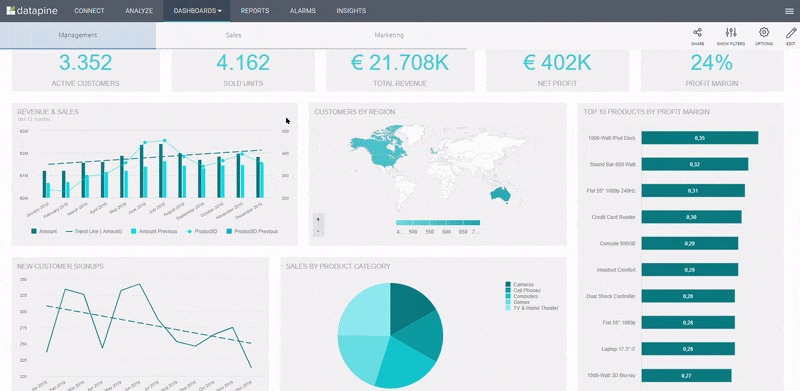
An interactive dashboard is one of the most important portal features for business. It filters unnecessary noise and presents critical data — KPIs, performance metrics, financial summaries — in a clear, visual format that non-technical users can understand at a glance.
Source: Datapine
Dashboards allow internal users to combine operational and financial data into a single centralized platform, helping you make data-driven decisions faster.
Key benefits of the interactive dashboard feature:
- Data visualization at a glance — Monitor business health through interactive reports. See how your email campaigns performed, how much revenue was generated, and which metrics need attention — all on one screen.
- Increased productivity — Success indicators (green/red status markers) highlight weak areas instantly. For instance, in a patient portal, staff can view user metrics and immediately identify where performance needs improvement.
- Task management — A well-designed dashboard surfaces urgent or overdue tasks first, allowing users to prioritize and mark items as complete.
2. Single Sign-On (SSO) and authentication – Secure, frictionless access
Single sign-on is an essential feature of any enterprise web portal. SSO allows users to authenticate once and gain access to multiple connected systems, eliminating password fatigue and reducing IT support tickets for password resets.
Key benefits of SSO in a web portal:
- Reduced login friction — Users access all portal tools with one set of credentials, improving adoption and satisfaction.
- Stronger security posture — Centralized authentication through SAML, OAuth, or Active Directory integration means fewer password-related vulnerabilities.
- Automated user provisioning — When integrated with your directory service, new employees or customers get instant portal access based on their role, and access is revoked automatically when they leave.
3. Security and access control – Protect sensitive data at every level
Web portal functionality must include robust, multi-layered security. Every business handles sensitive data — customer records, financial information, employee details and your portal must protect it.
Key benefits of security features in a web portal:
- Role-based access control (RBAC) — Define granular permissions so users only see what they are authorized to access. Administrators, managers, and end-users each get appropriate visibility.
- Audit trails and activity logging — Track every user action for compliance, forensic analysis, and accountability.
- Data encryption and SSL certificates — Protect data in transit and at rest. Combined with multifactor authentication (MFA), this creates a defense-in-depth approach that meets enterprise security standards.
- Compliance readiness — Built-in security controls help you meet GDPR, HIPAA, SOC 2, and other regulatory requirements.
4. Personalization and user customization – Deliver relevant experiences
Personalization is what transforms a generic portal into a powerful engagement tool. Each authorized user should receive content, notifications, and tools relevant to their role, department, location, or preferences.
Key benefits of personalization in a web portal:
- Targeted content delivery — Display different homepage widgets, news feeds, and resources based on user attributes (department, role, location).
- User-controlled customization — Let users arrange dashboard widgets, set notification preferences, and bookmark frequently used tools.
- Reduced information overload — Instead of showing everything to everyone, personalization filters content so users find what they need faster — improving satisfaction and portal adoption rates.
5. Document management – Centralize and secure your business data
Every business manages proposals, contracts, HR guidelines, onboarding documents, compliance forms, and more. As your business grows, managing these manually becomes costly, error-prone, and risky. A Document Management System (DMS) within your web portal solves this.
Key features of document management in web portals:
- Information indexing and content-based searching
- Version control with document revision tracking
- Multiple layers of security with role-based access
- Content management workflows with approval processes
- Automated backup and disaster recovery
Popular examples include Google Drive, Microsoft Office 365, and eFileCabinet.
Key benefits of document management:
- Data backup and disaster recovery — Digital documents are stored on protected backup servers, safe from physical disasters.
- Fast, traceable access — Find any document in seconds using metadata, tags, or full-text search — saving hours of manual searching.
- Scalability — A DMS grows with your enterprise, handling increasing document volumes without performance degradation.
6. Advanced search functionality – Help users find data instantly
According to a survey, up to 30% of customers use a search box when one is offered, and site search is 1.8 times more effective at producing conversions.
For any web portal with substantial content — product catalogs, knowledge bases, internal documentation — advanced search functionality is non-negotiable.
Key benefits of search features in a web portal:
- Improved user experience — Users find what they need without navigating through multiple pages. This reduces bounce rates and increases time-on-site, which search engines reward with higher rankings.
- Smart search capabilities — Implement search weighting, “best bets” (promoted results), auto-suggestions, and multi-category filtering to surface the most relevant results.
- Analytics integration — Connect your search box to analytics to understand exactly what users are looking for. Use this data to create dedicated pages for high-demand topics, boosting conversions and sales.
A top-rated web portal development company provides rich features like advanced search to eliminate navigation friction and improve customer engagement.
7. Data analytics and reporting – Turn raw data into actionable insights
As your online business grows, analyzing data to extract insights becomes critical for effective decision-making. Data analytics is one of the web portal features that separates good portals from great ones.
The analytics process involves importing data, cleaning it, performing ETL operations, and presenting actionable insights to management through visual reports and dashboards.
Key benefits of data analytics in a web portal:
- Streamlined operations — Identify production delays, supply chain bottlenecks, and operational inefficiencies. If a demand forecast shows a vendor cannot handle holiday volume, you can act before delays happen.
- Improved data security — Analyze past breach data to diagnose vulnerabilities, visualize audit logs, and build statistical models to prevent future attacks.
- Custom business reports — Generate reports that outline finances, strategies, goals, and departmental performance. These reports serve as managerial tools for planning, coordinating, and evaluating progress across the organization.
8. Content Management System (CMS) – Publish and update without developers
A built-in CMS is a critical web portal feature that empowers non-technical teams to create, edit, schedule, and publish content without developer involvement. This keeps your portal fresh and relevant.
Key benefits of CMS in a web portal:
- Self-service content publishing — Marketing, HR, and operations teams can update portal content directly — posting announcements, updating policies, or publishing training materials.
- Scheduling and version control — Set publication start and expiry dates for time-sensitive content. Track all changes with version history and restore previous versions if needed.
- Content tagging and organization — Tag content by category, department, or audience so it automatically appears in the right widgets and search results.
9. Mobile Responsiveness – Deliver a seamless experience on every device
With more users accessing portals from smartphones and tablets, mobile responsiveness is no longer optional. Your web portal must adapt fluidly to any screen size and device.
Key benefits of mobile responsiveness:
- Wider accessibility — Employees in the field, customers on the go, and vendors across time zones can all access the portal without being tied to a desktop.
- Consistent experience — Responsive design ensures forms, dashboards, reports, and navigation work correctly regardless of screen size.
- Higher engagement — Mobile-optimized portals see significantly higher usage rates and faster task completion times.
10. Third-party integrations – Connect your existing tools
No web portal operates in isolation. The ability to integrate with your existing software ecosystem — CRM, ERP, HR systems, accounting tools, marketing platforms — is a key web portal functionality requirement.
Key benefits of third-party integrations:
- Unified data flow — Sync customer data from Salesforce, employee records from Active Directory, financial data from your ERP, and project data from tools like Jira — all within the portal.
- API and SDK support — Modern web portal software development includes RESTful APIs and SDKs that allow custom integrations with virtually any business application.
- Elimination of data silos — When systems are connected, teams across departments work from the same source of truth, reducing errors and duplication.
11. Notifications and alerts – Keep users informed in real time
Timely notifications ensure users never miss critical updates, deadlines, or actions required of them.
Key benefits of notifications in a web portal:
- Multi-channel delivery — Push notifications, email alerts, in-app banners, and SMS notifications ensure users receive messages through their preferred channel.
- Personalized alerts — Notifications are filtered by role, department, or user preferences so people only receive what is relevant to them.
- Actionable notices — Link notifications directly to the tasks, documents, or pages that require attention, reducing friction between awareness and action.
12. Collaboration and communication tools – Keep teams aligned
Businesses with remote and geographically dispersed teams need collaboration tools built into their web portal to coordinate tasks and communicate effectively.
Key benefits of collaboration features in a web portal:
- Active participation and engagement — With remote work, direct interaction is minimal. Collaboration tools unite team members from every location, encouraging technical input and increasing employee satisfaction.
- Streamlined agile workflows — Remote teams can schedule daily standups, plan sprints, share real-time feedback, and access instant reports — all within the portal.
- Knowledge sharing — Discussion forums, wikis, shared documents, blogs, and comment threads create a living knowledge base that grows with your organization.
13. Forms & Workflow Automation – Eliminate Manual Processes
Forms and automated workflows replace manual, paper-based processes with digital efficiency. This is a feature that directly impacts operational speed and accuracy.
Key benefits of forms and workflow automation:
- Drag-and-drop form builders — Create forms for leave requests, purchase orders, support tickets, onboarding checklists, and more — without coding.
- Conditional workflow routing — Automatically route form submissions to the right approver based on type, amount, department, or urgency.
- Audit trail and accountability — Every form submission and workflow step is tracked, providing full visibility into process status and historical records.
14. Self-Service Tools – Reduce support costs and empower users
Self-service portals let customers, employees, and vendors resolve their own issues without contacting support — saving time and reducing operational costs.
Key benefits of self-service features:
- Knowledge base and FAQ access — Users search for answers to common questions, troubleshooting guides, and how-to articles before submitting a ticket.
- Account management — Users update their profiles, reset passwords, manage subscriptions, and track orders independently.
- Ticket submission and tracking — When self-service is not enough, users create support tickets and track resolution status in real time.
15. Scalability and performance – Build for growth
Web portal scalability features ensure your portal handles increasing traffic, data volumes, and feature additions without degradation. A portal that works for 100 users must also work for 10,000.
Key benefits of scalability in a web portal:
- Infrastructure flexibility — Cloud-based hosting, load balancing, and CDN integration ensure fast performance regardless of user volume.
- Modular architecture — Add new features, integrations, and modules over time without rebuilding the portal from scratch.
- Future-proofing — A scalable web portal system adapts to new technologies, platforms, and business requirements as they emerge.
16. User tracking and behavior analytics – Understand how users engage
Tracking tools give you deep insights into customer needs, activities, and behavior — revealing how visitors find your portal, what they do on it, and where they drop off.
Key benefits of tracking features in a web portal:
- Know your end users — Examine digital engagement and behavior: are they active on social media, responding to email campaigns, or attending webinars? Tracking reveals which marketing channels drive your best users.
- Optimize the portal experience — See which browsers and devices users prefer, which pages get the most engagement, and where users encounter friction. Use this data to prioritize UX improvements.
- Campaign performance — Understand lead motivation, qualify leads based on behavior, and identify when prospects are ready to convert.
17. Multilingual Support – Reach a Global Audience
For businesses serving international markets, multilingual support is a web portal feature that dramatically expands reach and improves user experience for non-English-speaking audiences.
Key benefits of multilingual support:
- Broader accessibility — Serve users in their preferred language, increasing engagement and reducing support requests from language barriers.
- Localized content delivery — Automatically display content in the correct language based on user profile or browser settings.
- Competitive advantage — Many portals lack multilingual support, making this a strong differentiator in global markets.
Want to Hire Expert Web Portal Developers for Your Business?
We have a team of experts who will understand your business requirements and build a custom web portal with all the features you need.
Key Web Portal Features Broken Down by Portal Type
Not every portal needs every feature. The key features of successful web portals vary depending on who your users are and what they need to accomplish. Here is a breakdown of essential features by portal type.
1. Features of customer portal
A customer portal is a self-service gateway where customers manage their accounts, find answers, and interact with your business.
Must-have features:
- Self-service knowledge base and FAQs
- Account management (profile, orders, billing)
- Support ticket submission and tracking
- Personalized dashboard with order status
- Secure payment processing
- Notifications for order updates and promotions
- Mobile-responsive design
2. Features of employee portal
An employee portal (intranet) serves as the digital workplace hub for your internal teams.
Must-have features:
- SSO with Active Directory integration
- HR document management (policies, handbooks, payroll)
- Leave and expense request workflows
- Internal communication tools (chat, forums, announcements)
- Training and onboarding modules
- Performance dashboards and goal tracking
- Company news feeds and event calendars
3. Features of vendor portal
A vendor portal streamlines procurement, communication, and collaboration with your supply chain partners.
Must-have features:
- Purchase order management and tracking
- Invoice submission and payment status
- Document exchange (contracts, compliance certificates)
- RFQ and bid management tools
- Performance scorecards and compliance tracking
- Role-based access for multiple vendor contacts
- Integration with ERP and procurement systems
4. Features of enterprise portal
An enterprise web portal unifies multiple business functions into a single platform for organization-wide use.
Must-have features:
- Single sign-on across all enterprise applications
- Role-based dashboards for executives, managers, and staff
- CRM, ERP, and HRMS integrations
- Advanced analytics and business intelligence reporting
- Workflow automation for cross-departmental processes
- Enterprise-grade security with audit trails
- Scalable architecture supporting thousands of concurrent users
- Multilingual and multi-location support
If you want to go deeper on what each portal type looks like in practice, explore our detailed guide on types of web portals to find the right fit for your business needs.
Have You Already Thought of Creating a Web Portal?
You have landed in the right place. Monocubed is a leading web portal development company that builds custom portals with all the features your business needs.
Build a Web Portal That Works for Your Business
Building a successful web portal goes far beyond putting together a basic list of features. From personalized dashboards and single sign-on to workflow automation, advanced analytics, and enterprise-grade scalability — every feature you choose directly shapes whether users engage, return, and get real value from the platform.
The bottom line: match your portal’s features to your users’ needs. A customer portal thrives on self-service and personalization. An employee portal runs on collaboration and HR workflows. A vendor portal cuts through procurement friction. And an enterprise portal ties it all together under one secure, scalable system.
Whether you are building a portal from scratch or upgrading an existing one, treat this guide as your feature checklist, so nothing critical slips through the cracks. If you need expert help putting it all together, Monocubed’s web portal development services are designed to turn your requirements into a secure, scalable, and fully custom portal built for real business results.
FAQs About Web Portal Features
-
What features should a web portal have?
A web portal should have these essential features: interactive dashboards, single sign-on (SSO), role-based security, personalization, document management, advanced search, data analytics, a content management system (CMS), mobile responsiveness, third-party integrations, notifications, collaboration tools, workflow automation, self-service tools, and scalability. The exact features depend on your portal type — customer, employee, vendor, or enterprise.
-
What is the difference between a website and a web portal?
A website delivers the same static content to every visitor and does not require login access. A web portal is a secure, personalized platform that requires authentication and delivers dynamic, role-based content tailored to each user. Portals include interactive features like dashboards, self-service tools, and collaboration capabilities that websites typically do not offer. Read our detailed comparison of portal vs website.
-
What are the essential features of an enterprise web portal?
Enterprise web portal features include single sign-on (SSO) across all applications, role-based dashboards, CRM, ERP, and HRMS integrations, advanced business intelligence reporting, cross-departmental workflow automation, enterprise-grade security with audit trails, scalable architecture for thousands of users, and multilingual support. These features ensure the portal serves as a unified digital workplace across the entire organization.
-
What are the benefits of a web portal for business?
The key benefits of a web portal include reduced support costs through self-service tools, improved productivity through centralized data access, stronger customer loyalty through personalized experiences, better decision-making through real-time analytics, streamlined operations through workflow automation, enhanced security through role-based access control, and scalable growth through modular architecture.
-
What are the different types of web portals?
The main types of web portals are customer portals (self-service and account management), employee portals (intranet and HR tools), vendor portals (procurement and supply chain), enterprise portals (organization-wide platform), B2B portals (business partner collaboration), B2C portals (consumer-facing services), patient portals (healthcare), community portals (forums and engagement), and eLearning portals (training and education).
-
How much does custom web portal development cost?
Custom web portal software development costs vary based on the number of features, integrations required, design complexity, security requirements, and scalability needs. A basic portal with core features may start at a lower investment, while a full-featured enterprise portal with advanced analytics, multiple integrations, and custom workflows requires a larger budget. Contact a web portal development company for an accurate estimate based on your specific requirements.
-
What are the scalability features of a web portal?
Web portal scalability features include cloud-based hosting with auto-scaling, load balancing for traffic distribution, CDN integration for global performance, modular architecture that allows adding features without rebuilding, database optimization for growing data volumes, microservices architecture for independent component scaling, and caching strategies for faster page loads. These features ensure your portal performs reliably as your user base grows.
-
How can you notify users about a new service or product?
Modern web portals use multi-channel notification systems including in-app push notifications, email alerts, SMS messages, and banner announcements. Notification APIs can send real-time alerts displayed as pop-up messages at the system level, even when the application is idle. Notifications can also be personalized by user role, department, or preference so each user receives only the updates relevant to them.

 All our projects are secured by NDA


